<?xml version="1.0" encoding="utf-8"?><feed xmlns="http://www.w3.org/2005/Atom" ><generator uri="https://jekyllrb.com/" version="3.10.0">Jekyll</generator><link href="https://blog.ndpsoftware.com/feed.xml" rel="self" type="application/atom+xml" /><link href="https://blog.ndpsoftware.com/" rel="alternate" type="text/html" /><updated>2025-11-06T00:33:16+00:00</updated><id>https://blog.ndpsoftware.com/feed.xml</id><title type="html">NDP Software Blog</title><subtitle>Thoughts on day-to-day software craftsmanship.</subtitle><author><name>Andy J. Peterson</name></author><entry><title type="html">Using Branded Types to Track String Encodings in Typescript</title><link href="https://blog.ndpsoftware.com/2025/11/branded-encoded-strings-typescript" rel="alternate" type="text/html" title="Using Branded Types to Track String Encodings in Typescript" /><published>2025-11-03T00:00:00+00:00</published><updated>2025-11-03T00:00:00+00:00</updated><id>https://blog.ndpsoftware.com/2025/11/branded-encoded-strings-typescript</id><content type="html" xml:base="https://blog.ndpsoftware.com/2025/11/branded-encoded-strings-typescript"><![CDATA[<p>Have you ever caught yourself coding by trial and error, randomly tweaking properties until something works? Perhaps adding CSS font properties without understanding why, or appending wildcards to a regular expression hoping it will match? You’re not alone.</p>

<p>This trial-and-error trap is particularly common with complex technical domains like regular expressions, character encoding, and CSS. Even experienced engineers fall into blindly modifying code until it appears to work, skipping the crucial step of understanding the underlying mechanisms. I once watched a developer attempt to fix garbled database text by cycling through character encodings until the problematic characters disappeared. While this approach might temporarily solve the visible issue, it often masks the root cause and creates harder-to-debug problems down the line.</p>

<p>This article focuses on text encoding, though the principles apply broadly. During my work on AmpWhat (a Unicode exploration tool), I learned firsthand the importance of careful, deliberate encoding handling. The application needed to process any possible Unicode character correctly, and any encoding mistakes would cascade into downstream errors. Through this experience, I discovered many popular libraries handled text encoding too casually to be reliable. Let’s explore a more rigorous approach.</p>

<h2 id="branding-to-track-encodings">Branding to Track Encodings</h2>

<p>“Branded Types” are a technique in TypeScript that allows you to create distinct types based on existing ones, without adding any runtime overhead. This is particularly useful for ensuring type safety in scenarios where you want to differentiate between similar types that have different meanings or contexts.</p>

<p>Let’s apply this to string encoding. When working with encoded strings, we often make mistakes like:</p>
<ul>
  <li>Double-encoding a URL string</li>
  <li>Forgetting to HTML-escape text before inserting it into HTML</li>
  <li>Decoding a string that wasn’t encoded in the first place</li>
</ul>

<p>We can use branded types to catch these errors at compile time. Here’s how:</p>

<div class="language-ts highlighter-rouge"><div class="highlight"><pre class="highlight"><code><span class="kd">type</span> <span class="nx">Encoding</span> <span class="o">=</span> <span class="dl">'</span><span class="s1">URL</span><span class="dl">'</span> <span class="o">|</span> <span class="dl">'</span><span class="s1">base64</span><span class="dl">'</span> <span class="o">|</span> <span class="dl">'</span><span class="s1">HTML</span><span class="dl">'</span> <span class="o">|</span> <span class="dl">'</span><span class="s1">XML</span><span class="dl">'</span> <span class="o">|</span> <span class="dl">'</span><span class="s1">SQL</span><span class="dl">'</span> <span class="o">|</span> <span class="dl">'</span><span class="s1">Shell</span><span class="dl">'</span> <span class="c1">// some examples </span>
<span class="kr">declare</span> <span class="kd">const</span> <span class="nx">_encoding</span><span class="p">:</span> <span class="nx">unique</span> <span class="nx">symbol</span><span class="p">;</span>  
<span class="k">export</span> <span class="kd">type</span> <span class="nx">EncodedString</span><span class="o">&lt;</span><span class="nx">E</span> <span class="kd">extends</span> <span class="nx">Encoding</span> <span class="o">=</span> <span class="p">[]</span><span class="o">&gt;</span> <span class="o">=</span> <span class="kr">string</span> <span class="o">&amp;</span> <span class="p">{</span> <span class="k">readonly</span> <span class="p">[</span><span class="nx">_encoding</span><span class="p">]:</span> <span class="nx">E</span> <span class="p">};</span>  
</code></pre></div></div>
<p>This <em>parameterized</em> branded type will let you create types that represent strings with specific encodings. For example, a URL-encoded string would have the type <code class="language-plaintext highlighter-rouge">EncodedString&lt;'URL'&gt;</code>. You could then create functions that only accept strings with certain encodings, preventing accidental misuse.</p>

<p>This creates a type that “brands” strings with their encoding. For example:</p>
<div class="language-ts highlighter-rouge"><div class="highlight"><pre class="highlight"><code><span class="k">export</span> <span class="kd">function</span> <span class="nx">urlEncode</span><span class="o">&lt;</span><span class="nx">S</span> <span class="kd">extends</span> <span class="kr">string</span><span class="o">&gt;</span><span class="p">(</span><span class="nx">s</span><span class="p">:</span> <span class="nx">S</span><span class="p">):</span> <span class="nx">EncodedString</span><span class="o">&lt;</span><span class="dl">'</span><span class="s1">URL</span><span class="dl">'</span><span class="o">&gt;</span> <span class="p">{</span>  
   <span class="k">return</span> <span class="nb">encodeURIComponent</span><span class="p">(</span><span class="nx">s</span><span class="p">)</span> <span class="k">as</span> <span class="nx">EncodedString</span><span class="o">&lt;</span><span class="dl">'</span><span class="s1">URL</span><span class="dl">'</span><span class="o">&gt;</span><span class="p">;</span>  
<span class="p">}</span>  

<span class="k">export</span> <span class="kd">function</span> <span class="nx">urlDecode</span><span class="o">&lt;</span><span class="nx">S</span> <span class="kd">extends</span> <span class="nx">EncodedString</span><span class="o">&lt;</span><span class="dl">'</span><span class="s1">URL</span><span class="dl">'</span><span class="o">&gt;&gt;</span><span class="p">(</span><span class="nx">s</span><span class="p">:</span> <span class="nx">S</span><span class="p">):</span> <span class="kr">string</span> <span class="p">{</span>  
   <span class="k">return</span> <span class="nb">decodeURIComponent</span><span class="p">(</span><span class="nx">s</span> <span class="k">as</span> <span class="nx">unknown</span> <span class="k">as</span> <span class="kr">string</span><span class="p">);</span>  
<span class="p">}</span>  
</code></pre></div></div>
<p>This function only accepts strings that are known to be URL-encoded, preventing accidental decoding of already decoded strings.</p>

<p>Now Typescript will prevent common encoding mistakes:</p>
<div class="language-ts highlighter-rouge"><div class="highlight"><pre class="highlight"><code><span class="kd">const</span> <span class="nx">plain</span> <span class="o">=</span> <span class="dl">'</span><span class="s1">hello world</span><span class="dl">'</span>
<span class="kd">const</span> <span class="nx">encoded</span> <span class="o">=</span> <span class="nx">urlEncode</span><span class="p">(</span><span class="nx">plain</span><span class="p">)</span>      <span class="c1">// OK</span>
<span class="nx">urlDecode</span><span class="p">(</span><span class="nx">encoded</span><span class="p">)</span>                  <span class="c1">// OK</span>
<span class="nx">urlDecode</span><span class="p">(</span><span class="nx">plain</span><span class="p">)</span>                      <span class="c1">// Error: Expected EncodedString&lt;'URL'&gt;</span>
<span class="nx">urlEncode</span><span class="p">(</span><span class="nx">encoded</span><span class="p">)</span>                    <span class="c1">// OK (but we can improve this later)</span>
</code></pre></div></div>

<h2 id="layers-of-encoding">Layers of Encoding</h2>
<p>After building the initial solution, I discovered an important limitation: strings often need multiple encodings applied in sequence. For example:</p>

<ul>
  <li>A base64-encoded string placed in a URL needs URL encoding on top</li>
  <li>Text in a URL parameter that goes into HTML needs both URL and HTML encoding</li>
  <li>Database text that gets base64-encoded and then URL-encoded for transport</li>
</ul>

<p>To track this encoding chain, we need to modify our branded type to maintain a stack of encodings. Instead of a single encoding type, we’ll track an ordered sequence:</p>
<div class="language-ts highlighter-rouge"><div class="highlight"><pre class="highlight"><code><span class="kd">type</span> <span class="nx">EncodingSequence</span> <span class="o">=</span> <span class="nb">Array</span><span class="o">&lt;</span><span class="nx">Encoding</span><span class="o">&gt;</span>

<span class="k">export</span> <span class="kd">type</span> <span class="nx">EncodedString</span><span class="o">&lt;</span><span class="nx">E</span> <span class="kd">extends</span> <span class="nx">EncodingSequence</span> <span class="o">=</span> <span class="p">[]</span><span class="o">&gt;</span> <span class="o">=</span> <span class="kr">string</span> <span class="o">&amp;</span> <span class="p">{</span> <span class="k">readonly</span> <span class="p">[</span><span class="nx">_encoding</span><span class="p">]:</span> <span class="nx">E</span> <span class="p">};</span>  
</code></pre></div></div>

<p>There are a few more pieces that go into play, but let’s look at a new basic encoding function:</p>
<div class="language-ts highlighter-rouge"><div class="highlight"><pre class="highlight"><code><span class="k">export</span> <span class="kd">function</span> <span class="nx">urlEncode</span><span class="o">&lt;</span><span class="nx">S</span> <span class="kd">extends</span> <span class="kr">string</span><span class="o">&gt;</span><span class="p">(</span><span class="nx">s</span><span class="p">:</span> <span class="nx">S</span><span class="p">)</span> <span class="p">{</span>
    <span class="k">return</span> <span class="nb">encodeURIComponent</span><span class="p">(</span><span class="nx">s</span><span class="p">)</span> <span class="k">as</span> <span class="nx">AddEncoding</span><span class="o">&lt;</span><span class="dl">'</span><span class="s1">URL</span><span class="dl">'</span><span class="p">,</span> <span class="nx">S</span><span class="o">&gt;</span>
<span class="p">}</span>
</code></pre></div></div>
<p>This requires a utility type to add the new encoding to the stack:</p>
<div class="language-ts highlighter-rouge"><div class="highlight"><pre class="highlight"><code><span class="kd">type</span> <span class="nx">AddEncoding</span><span class="o">&lt;</span><span class="nx">NewEncoding</span> <span class="kd">extends</span> <span class="nx">Encoding</span><span class="p">,</span> <span class="nx">ExistingStr</span> <span class="kd">extends</span> <span class="kr">string</span><span class="o">&gt;</span> <span class="o">=</span>
    <span class="nx">ExistingStr</span> <span class="kd">extends</span> <span class="nx">EncodedString</span><span class="o">&lt;</span><span class="nx">infer</span> <span class="nx">ExistingEncodings</span><span class="o">&gt;</span>
        <span class="p">?</span> <span class="nx">EncodedString</span><span class="o">&lt;</span><span class="nx">Push</span><span class="o">&lt;</span><span class="nx">ExistingEncodings</span><span class="p">,</span> <span class="nx">NewEncoding</span><span class="o">&gt;&gt;</span>
        <span class="p">:</span> <span class="nx">EncodedString</span><span class="o">&lt;</span><span class="p">[</span><span class="nx">NewEncoding</span><span class="p">]</span><span class="o">&gt;</span><span class="p">;</span>
</code></pre></div></div>
<p>And of course you need to decode a string:</p>
<div class="language-ts highlighter-rouge"><div class="highlight"><pre class="highlight"><code><span class="c1">// (incomplete)</span>
<span class="k">export</span> <span class="kd">function</span> <span class="nx">urlDecode</span><span class="o">&lt;</span><span class="nx">S</span> <span class="kd">extends</span> <span class="nx">EncodedString</span><span class="o">&lt;</span><span class="nx">EncodingSequence</span><span class="o">&gt;&gt;</span><span class="p">(</span><span class="nx">encoded</span><span class="p">:</span> <span class="nx">S</span><span class="p">)</span> <span class="p">{</span>  
   <span class="k">return</span> <span class="nb">decodeURIComponent</span><span class="p">(</span><span class="nx">encoded</span> <span class="k">as</span> <span class="nx">unknown</span> <span class="k">as</span> <span class="kr">string</span><span class="p">)</span> <span class="k">as</span> <span class="nx">unknown</span> <span class="k">as</span> <span class="nx">EncodedString</span><span class="o">&lt;</span><span class="nx">PreviousEncodingOf</span><span class="o">&lt;</span><span class="nx">S</span><span class="o">&gt;&gt;</span><span class="p">;</span>  
<span class="p">}</span>

<span class="kd">type</span> <span class="nx">PreviousEncodingOf</span><span class="o">&lt;</span><span class="nx">S</span> <span class="kd">extends</span> <span class="kr">string</span><span class="o">&gt;</span> <span class="o">=</span> <span class="nx">Pop</span><span class="o">&lt;</span><span class="nx">EncodingsOf</span><span class="o">&lt;</span><span class="nx">S</span><span class="o">&gt;&gt;</span>
<span class="kd">type</span> <span class="nx">EncodingsOf</span><span class="o">&lt;</span><span class="nx">S</span> <span class="kd">extends</span> <span class="kr">string</span><span class="o">&gt;</span> <span class="o">=</span> <span class="nx">S</span> <span class="kd">extends</span> <span class="nx">EncodedString</span><span class="o">&lt;</span><span class="nx">infer</span> <span class="nx">T</span><span class="o">&gt;</span> <span class="p">?</span> <span class="nx">T</span> <span class="p">:</span> <span class="p">[]</span>
<span class="kd">type</span> <span class="nx">Pop</span><span class="o">&lt;</span><span class="nx">T</span> <span class="kd">extends</span> <span class="nx">Encoding</span><span class="p">[]</span><span class="o">&gt;</span> <span class="o">=</span> <span class="nx">T</span> <span class="kd">extends</span> <span class="p">[...</span><span class="nx">infer</span> <span class="nx">U</span><span class="p">,</span> <span class="nx">Encoding</span><span class="p">]</span> <span class="p">?</span> <span class="nx">U</span> <span class="p">:</span> <span class="nx">never</span>
</code></pre></div></div>
<p>But this doesn’t verify the encoding parameter. To do that we need a way to verify the last encoding matches:</p>
<div class="language-ts highlighter-rouge"><div class="highlight"><pre class="highlight"><code><span class="k">export</span> <span class="kd">function</span> <span class="nx">urlDecode</span><span class="o">&lt;</span><span class="nx">S</span> <span class="kd">extends</span> <span class="nx">EncodedString</span><span class="o">&lt;</span><span class="nx">EncodingSequence</span><span class="o">&gt;&gt;</span><span class="p">(</span><span class="nx">encoded</span><span class="p">:</span> <span class="nx">HasLast</span><span class="o">&lt;</span><span class="nx">S</span><span class="p">,</span> <span class="dl">'</span><span class="s1">URL</span><span class="dl">'</span><span class="o">&gt;</span><span class="p">)</span> <span class="p">{</span>  
   <span class="k">return</span> <span class="nb">decodeURIComponent</span><span class="p">(</span><span class="nx">encoded</span> <span class="k">as</span> <span class="nx">unknown</span> <span class="k">as</span> <span class="kr">string</span><span class="p">)</span> <span class="k">as</span> <span class="nx">unknown</span> <span class="k">as</span> <span class="nx">EncodedString</span><span class="o">&lt;</span><span class="nx">PreviousEncodingOf</span><span class="o">&lt;</span><span class="nx">S</span><span class="o">&gt;&gt;</span><span class="p">;</span>  
<span class="p">}</span>  
</code></pre></div></div>
<p>We’ll need a couple more utility types to get the last encoding and the previous encoding:</p>
<div class="language-ts highlighter-rouge"><div class="highlight"><pre class="highlight"><code><span class="kd">type</span> <span class="nx">HasLast</span><span class="o">&lt;</span><span class="nx">S</span> <span class="kd">extends</span> <span class="kr">string</span><span class="p">,</span> <span class="nx">E</span> <span class="kd">extends</span> <span class="nx">Encoding</span><span class="o">&gt;</span> <span class="o">=</span> <span class="nx">S</span> <span class="kd">extends</span> <span class="nx">EncodedString</span><span class="o">&lt;</span><span class="nx">infer</span> <span class="nx">T</span><span class="o">&gt;</span>
    <span class="p">?</span> <span class="nx">T</span> <span class="kd">extends</span> <span class="p">[...</span><span class="nx">infer</span> <span class="nx">Rest</span><span class="p">,</span> <span class="nx">infer</span> <span class="nx">L</span><span class="p">]</span>
        <span class="p">?</span> <span class="nx">L</span> <span class="kd">extends</span> <span class="nx">E</span>
            <span class="p">?</span> <span class="nx">S</span>
            <span class="p">:</span> <span class="s2">`Expected last encoding to be </span><span class="p">${</span><span class="nx">E</span><span class="p">}</span><span class="s2">, but got </span><span class="p">${</span><span class="nx">L</span><span class="p">}</span><span class="s2">`</span>
        <span class="p">:</span> <span class="s2">`String has no encodings`</span>
    <span class="p">:</span> <span class="s2">`String has no encodings`</span><span class="p">;</span>

</code></pre></div></div>

<h3 id="double-encoding">Double Encoding</h3>
<p>This worked great, but I quickly ran into a common problem: <strong>double encoding</strong>. This happens when a string is encoded multiple times with the same encoding, and I would say is one of the more common bugs. For example, URL-encoding an already URL-encoded string leads to incorrect results. This can be prevented with an additional type check in the encoding function:</p>
<div class="language-ts highlighter-rouge"><div class="highlight"><pre class="highlight"><code><span class="k">export</span> <span class="kd">function</span> <span class="nx">urlEncode</span><span class="o">&lt;</span><span class="nx">S</span> <span class="kd">extends</span> <span class="kr">string</span><span class="o">&gt;</span><span class="p">(</span><span class="nx">s</span><span class="p">:</span> <span class="nx">NotLast</span><span class="o">&lt;</span><span class="nx">S</span><span class="p">,</span> <span class="dl">'</span><span class="s1">URL</span><span class="dl">'</span><span class="o">&gt;</span><span class="p">)</span> <span class="p">{</span>
    <span class="k">return</span> <span class="nb">encodeURIComponent</span><span class="p">(</span><span class="nx">s</span><span class="p">)</span> <span class="k">as</span> <span class="nx">AddEncoding</span><span class="o">&lt;</span><span class="dl">'</span><span class="s1">URL</span><span class="dl">'</span><span class="p">,</span> <span class="nx">S</span><span class="o">&gt;</span>
<span class="p">}</span>

<span class="c1">// helper: get the last encoding only if it is NOT E; otherwise never</span>
<span class="kd">type</span> <span class="nx">NotLast</span><span class="o">&lt;</span><span class="nx">S</span><span class="p">,</span> <span class="nx">E</span> <span class="kd">extends</span> <span class="nx">Encoding</span><span class="o">&gt;</span> <span class="o">=</span> <span class="nx">S</span> <span class="kd">extends</span> <span class="nx">EncodedString</span><span class="o">&lt;</span><span class="nx">infer</span> <span class="nx">T</span><span class="o">&gt;</span>
    <span class="p">?</span> <span class="nx">T</span> <span class="kd">extends</span> <span class="p">[...</span><span class="nx">infer</span> <span class="nx">Rest</span><span class="p">,</span> <span class="nx">infer</span> <span class="nx">L</span><span class="p">]</span>
        <span class="p">?</span> <span class="nx">L</span> <span class="kd">extends</span> <span class="nx">E</span>
            <span class="p">?</span> <span class="s2">`Already encoded as </span><span class="p">${</span><span class="nx">L</span><span class="p">}</span><span class="s2">`</span>
            <span class="p">:</span> <span class="nx">S</span>
        <span class="p">:</span> <span class="nx">S</span>
    <span class="p">:</span> <span class="nx">S</span>
</code></pre></div></div>

<p>There are a few pieces there, but they all work together to prevent double encoding. The <code class="language-plaintext highlighter-rouge">NotLast</code> type checks if the last encoding in the stack is the same as the new encoding being applied. If it is, it produces a compile-time error message instead of allowing the encoding to proceed.</p>

<h2 id="the-code">The Code</h2>

<p>All these together allow us to create a type-safe encoding/decoding system that prevents double encoding and ensures proper decode order. You can look around at the code <a href="https://github.com/ndp/ts-playground/tree/main/src/encoded-string">here</a> if you want to see the implementation.</p>

<h2 id="wrapping-up">Wrapping Up</h2>

<p>Years ago I encountered a library that tried to solve text-encoding problems once and for all. I don’t remember the language or the name, but it introduced a string class that tracked encodings and used operator overloading to apply the correct encoding automatically. For example, inserting a string into an HTML document would automatically apply HTML encoding — it felt like magic.</p>

<p>That idea stayed with me. While working extensively in TypeScript recently, I wondered whether a similar approach could be practical there. The original library’s main drawback was that every piece of text had to live inside the library, which broke compatibility with the wider ecosystem. Although not quite as magical, I think TypeScript’s type erasure reduces that interoperability problem.</p>

<p>A sensible next step would be to update existing library signatures to accept and return <code class="language-plaintext highlighter-rouge">EncodedString</code> types instead of only exposing encode/decode helpers. That would add compile‑time encoding protection without changing runtime behavior.</p>

<p>Spiking this idea convinced me there is real potential with little overhead. For any system that pipes strings through multiple stages, I would seriously consider this approach.</p>

<p>I’ve been curious about branded types for a while — they remind me of Java’s marker interfaces. They feel a bit like a hack, but they work well in TypeScript, and I plan to keep using them.</p>]]></content><author><name>Andy J. Peterson</name></author><category term="software development" /><category term="Typescript" /><category term="branded types" /><category term="encoding" /><summary type="html"><![CDATA[Have you ever caught yourself coding by trial and error, randomly tweaking properties until something works? Perhaps adding CSS font properties without understanding why, or appending wildcards to a regular expression hoping it will match? You’re not alone.]]></summary></entry><entry><title type="html">Take-home Code Challenge for Employers</title><link href="https://blog.ndpsoftware.com/2024/11/take-home-code-challenge" rel="alternate" type="text/html" title="Take-home Code Challenge for Employers" /><published>2024-11-20T00:00:00+00:00</published><updated>2024-11-20T00:00:00+00:00</updated><id>https://blog.ndpsoftware.com/2024/11/take-home-code-challenge</id><content type="html" xml:base="https://blog.ndpsoftware.com/2024/11/take-home-code-challenge"><![CDATA[<p>Welcome, and congratulations on reaching this exciting stage of the hiring process! I’m thrilled that you’re considering having me join your team.</p>

<p>To help me understand your team, and its problem-solving skills, technical proficiency, creativity, and collaborative dynamics, I’ve designed a take-home code challenge for your team.
This challenge is your chance to showcase your team’s coding abilities in a relaxed, real-world environment. I’ve crafted the problem to be both engaging and fun, so it won’t seem like work. I’m looking forward to seeing what you come up with!</p>

<p>Please approach this as you would any internal project, including typical communication and code review processes. Make sure to leverage the whole team so it’ll go fast. This exercise is not just about the end product but also about showcasing your team’s work culture and communication.</p>

<h2 id="timeline">Timeline:</h2>

<p>Please spend about 30 minutes. But you will be given two weeks, just in case.</p>

<h2 id="evaluation-criteria">Evaluation Criteria:</h2>

<p>I will use my proprietary rubric. It is based on numbers, so it’s scientific. Due to the number of jobs I am interested in, I’m not able to provide specific feedback on your submission.</p>

<h2 id="technical-requirements">Technical Requirements:</h2>

<ul>
  <li>Use a front-end framework/library of your choice. But, well, we use React, so how’s it going to look if you use Angular?</li>
  <li>Implement a back-end service using a technology stack you’re comfortable with, but we use GoLang.</li>
  <li>Use Oracle (rdb) to store user and task information.</li>
  <li>Include error handling and input validation.</li>
  <li>Write unit and integration tests.</li>
  <li>Deploy on your favorite cloud provider (e.g., Azure) using a CI/CD pipeline and Kubernetes.</li>
</ul>

<p>Okay, finally, here’s the project:</p>

<h2 id="project-the-github-analyzer">Project: The GitHub Analyzer</h2>

<h3 id="overview">Overview:</h3>
<p>Develop an application that evaluates GitHub profiles. The goal is to assess job candidates based solely on their GitHub profile, in an automated way, and determine whether the candidate is a “good” fit or not for a job. (I know, meta, non?)</p>

<h3 id="project-description">Project Description:</h3>

<p>Implement 3 or more of these:</p>

<ol>
  <li><strong>Emotional Intelligence (EI) Score:</strong> Analyze commit messages for the number of emojis used. The more emojis, the higher the score.</li>
  <li><strong>Dedication Score:</strong> Track the number of commits made between midnight and 4 AM to gauge dedication.</li>
  <li><strong>Detail-Oriented Score:</strong> Score based on the average length of commit messages. Longer messages indicate a love for storytelling, but more importantly, knowing the details.</li>
  <li><strong>Tech Savvy Score:</strong> Count the number of tech buzzwords in commit messages and documentation. Extra points for using “synergy,” “blockchain,” or “machine learning” in irrelevant contexts.</li>
  <li><strong>Perfection Score:</strong> Measure how often files are renamed. Frequent renaming could indicate a quest for perfection.</li>
  <li><strong>Maintainability Score:</strong> Assess the ratio of comments to actual code. A higher ratio often means the code is well-documented, which can make it easier to understand, especially for new developers or those maintaining the code in the future.</li>
  <li><strong>Collaboration Score:</strong> Analyze the number of comments and discussions in pull requests. High activity suggests a love for drama or collaboration.</li>
  <li><strong>Clarity Score:</strong> Reward candidates for the longest variable names. Because clearly, <code class="language-plaintext highlighter-rouge">supercalifragilisticexpialidociousVariableName</code> is better than <code class="language-plaintext highlighter-rouge">i</code>.</li>
  <li><strong>Creativity and Thoughtfulness:</strong> Evaluate commit messages based on their poetic qualities. Extra points for haikus, limericks, and sonnets.</li>
  <li><strong>Passion for the Job:</strong> Count the number of flame wars the candidate has engaged in over tabs vs. spaces. High engagement equals high passion, right?</li>
  <li><strong>Fun Co-worker Score:</strong> Measure the number of hidden Easter eggs in the codebase. More Easter eggs, more fun!</li>
  <li><strong>Productivity:</strong> Check how many commits happen per hour. More commits == more productivity!</li>
  <li><strong>Planning Ability:</strong> Measure the amount of commented-out code. The more, the better, because YJMNI (“you just might need it”). Optionally, track the number of TODO comments left in the code. It shows they’re planning for the future.</li>
  <li><strong>Technical Proficiency:</strong> Evaluate how much ASCII art is present in the code comments. True talent lies in drawing within the code!</li>
  <li><strong>Code Readability Score:</strong> The more hardcoded magic numbers in the code, the higher the score. <code class="language-plaintext highlighter-rouge">7</code> is more readable than <code class="language-plaintext highlighter-rouge">seven</code>, right?</li>
  <li><strong>Make up your own!</strong> Show me your creativity by coming up with your own revealing metrics.</li>
</ol>]]></content><author><name>Andy J. Peterson</name></author><category term="software development" /><category term="interviews" /><category term="hiring" /><category term="sarcasm" /><summary type="html"><![CDATA[Welcome, and congratulations on reaching this exciting stage of the hiring process! I’m thrilled that you’re considering having me join your team. To help me understand your team, and its problem-solving skills, technical proficiency, creativity, and collaborative dynamics, I’ve designed a take-home code challenge for your team. This challenge is your chance to showcase your team’s coding abilities in a relaxed, real-world environment. I’ve crafted the problem to be both engaging and fun, so it won’t seem like work. I’m looking forward to seeing what you come up with! Please approach this as you would any internal project, including typical communication and code review processes. Make sure to leverage the whole team so it’ll go fast. This exercise is not just about the end product but also about showcasing your team’s work culture and communication. Timeline: Please spend about 30 minutes. But you will be given two weeks, just in case. Evaluation Criteria: I will use my proprietary rubric. It is based on numbers, so it’s scientific. Due to the number of jobs I am interested in, I’m not able to provide specific feedback on your submission. Technical Requirements: Use a front-end framework/library of your choice. But, well, we use React, so how’s it going to look if you use Angular? Implement a back-end service using a technology stack you’re comfortable with, but we use GoLang. Use Oracle (rdb) to store user and task information. Include error handling and input validation. Write unit and integration tests. Deploy on your favorite cloud provider (e.g., Azure) using a CI/CD pipeline and Kubernetes. Okay, finally, here’s the project: Project: The GitHub Analyzer Overview: Develop an application that evaluates GitHub profiles. The goal is to assess job candidates based solely on their GitHub profile, in an automated way, and determine whether the candidate is a “good” fit or not for a job. (I know, meta, non?) Project Description: Implement 3 or more of these: Emotional Intelligence (EI) Score: Analyze commit messages for the number of emojis used. The more emojis, the higher the score. Dedication Score: Track the number of commits made between midnight and 4 AM to gauge dedication. Detail-Oriented Score: Score based on the average length of commit messages. Longer messages indicate a love for storytelling, but more importantly, knowing the details. Tech Savvy Score: Count the number of tech buzzwords in commit messages and documentation. Extra points for using “synergy,” “blockchain,” or “machine learning” in irrelevant contexts. Perfection Score: Measure how often files are renamed. Frequent renaming could indicate a quest for perfection. Maintainability Score: Assess the ratio of comments to actual code. A higher ratio often means the code is well-documented, which can make it easier to understand, especially for new developers or those maintaining the code in the future. Collaboration Score: Analyze the number of comments and discussions in pull requests. High activity suggests a love for drama or collaboration. Clarity Score: Reward candidates for the longest variable names. Because clearly, supercalifragilisticexpialidociousVariableName is better than i. Creativity and Thoughtfulness: Evaluate commit messages based on their poetic qualities. Extra points for haikus, limericks, and sonnets. Passion for the Job: Count the number of flame wars the candidate has engaged in over tabs vs. spaces. High engagement equals high passion, right? Fun Co-worker Score: Measure the number of hidden Easter eggs in the codebase. More Easter eggs, more fun! Productivity: Check how many commits happen per hour. More commits == more productivity! Planning Ability: Measure the amount of commented-out code. The more, the better, because YJMNI (“you just might need it”). Optionally, track the number of TODO comments left in the code. It shows they’re planning for the future. Technical Proficiency: Evaluate how much ASCII art is present in the code comments. True talent lies in drawing within the code! Code Readability Score: The more hardcoded magic numbers in the code, the higher the score. 7 is more readable than seven, right? Make up your own! Show me your creativity by coming up with your own revealing metrics.]]></summary></entry><entry><title type="html">A type-narrowing Typescript isPromise</title><link href="https://blog.ndpsoftware.com/2023/05/is-promise" rel="alternate" type="text/html" title="A type-narrowing Typescript isPromise" /><published>2023-05-20T00:00:00+00:00</published><updated>2023-05-20T00:00:00+00:00</updated><id>https://blog.ndpsoftware.com/2023/05/is-promise</id><content type="html" xml:base="https://blog.ndpsoftware.com/2023/05/is-promise"><![CDATA[<p>On a recent project, I needed to detect whether I was given a promise or not. This seems like a weird requirement, but I was writing a “makeRetryable” function that I wanted to work for both synchronous or asynchronous code. Trust me, it was real.</p>

<p>Anyway, I poked around the internet and found various <code class="language-plaintext highlighter-rouge">isPromise</code> functions. They “worked” in Typescript, but none of them seemed to do the logical thing: narrow the type of the Promise in the process of detecting it. This involves that weird Typescript dance of implementing the same logic in both Javascript and Typescript’s type language (whatever that is called). Here’s my solution:</p>

<div class="language-typescript highlighter-rouge"><div class="highlight"><pre class="highlight"><code><span class="cm">/*
An `isPromise` detector that narrows the type of the promise return type, when returning `true`.
 */</span>
<span class="k">export</span> <span class="kd">function</span> <span class="nx">isPromise</span><span class="o">&lt;</span><span class="nx">T</span> <span class="o">=</span> <span class="nx">unknown</span><span class="o">&gt;</span><span class="p">(</span><span class="nx">obj</span><span class="p">:</span> <span class="nx">unknown</span><span class="p">):</span>
  <span class="nx">obj</span> <span class="k">is</span> <span class="nx">T</span> <span class="kd">extends</span> <span class="p">{</span> <span class="na">then</span><span class="p">:</span> <span class="p">(...</span><span class="na">args</span><span class="p">:</span> <span class="nx">unknown</span><span class="p">[])</span> <span class="o">=&gt;</span> <span class="nx">unknown</span> <span class="p">}</span> <span class="p">?</span> <span class="nb">Promise</span><span class="o">&lt;</span><span class="nx">Awaited</span><span class="o">&lt;</span><span class="nx">T</span><span class="o">&gt;&gt;</span> <span class="p">:</span> <span class="nx">never</span> <span class="p">{</span>
  <span class="k">return</span> <span class="o">!!</span><span class="nx">obj</span> <span class="o">&amp;&amp;</span>
    <span class="p">(</span><span class="k">typeof</span> <span class="nx">obj</span> <span class="o">===</span> <span class="dl">'</span><span class="s1">object</span><span class="dl">'</span> <span class="o">||</span> <span class="k">typeof</span> <span class="nx">obj</span> <span class="o">===</span> <span class="dl">'</span><span class="s1">function</span><span class="dl">'</span><span class="p">)</span> <span class="o">&amp;&amp;</span>
    <span class="k">typeof</span> <span class="nx">obj</span><span class="p">.</span><span class="nx">then</span> <span class="o">===</span> <span class="dl">'</span><span class="s1">function</span><span class="dl">'</span><span class="p">;</span>
<span class="p">}</span>
</code></pre></div></div>
<p>That’s it.</p>

<p>For those who want to see the tests, they are here:</p>

<div class="language-typescript highlighter-rouge"><div class="highlight"><pre class="highlight"><code><span class="k">import</span> <span class="p">{</span><span class="nx">strict</span> <span class="k">as</span> <span class="nx">assert</span><span class="p">}</span> <span class="k">from</span> <span class="dl">'</span><span class="s1">assert</span><span class="dl">'</span>
<span class="k">import</span> <span class="kd">type</span> <span class="p">{</span><span class="nx">Equal</span><span class="p">,</span> <span class="nx">Expect</span><span class="p">}</span> <span class="k">from</span> <span class="dl">'</span><span class="s1">@type-challenges/utils</span><span class="dl">'</span>

<span class="kd">function</span> <span class="nx">testIsPromise</span><span class="p">()</span> <span class="p">{</span>
  <span class="c1">// Happy path</span>
  <span class="kd">const</span> <span class="nx">maybe</span> <span class="o">=</span> <span class="nb">Math</span><span class="p">.</span><span class="nx">random</span><span class="p">()</span> <span class="o">&lt;</span> <span class="mi">2</span>
  <span class="kd">const</span> <span class="nx">fooPromise</span> <span class="o">=</span> <span class="nx">maybe</span> <span class="p">?</span> <span class="nb">Promise</span><span class="p">.</span><span class="nx">resolve</span><span class="p">(</span><span class="dl">'</span><span class="s1">foo</span><span class="dl">'</span> <span class="k">as</span> <span class="kd">const</span><span class="p">)</span> <span class="p">:</span> <span class="dl">'</span><span class="s1">bar</span><span class="dl">'</span>
  <span class="nx">assert</span><span class="p">.</span><span class="nx">equal</span><span class="p">(</span><span class="nx">isPromise</span><span class="p">(</span><span class="nx">fooPromise</span><span class="p">),</span> <span class="kc">true</span><span class="p">)</span>

  <span class="c1">// Show that the types are narrowed properly</span>
  <span class="k">if</span> <span class="p">(</span><span class="nx">isPromise</span><span class="p">(</span><span class="nx">fooPromise</span><span class="p">))</span>
    <span class="kd">type</span> <span class="nx">cases1</span> <span class="o">=</span> <span class="p">[</span>
      <span class="nx">Expect</span><span class="o">&lt;</span><span class="nx">Equal</span><span class="o">&lt;</span><span class="k">typeof</span> <span class="nx">fooPromise</span><span class="p">,</span> <span class="nb">Promise</span><span class="o">&lt;</span><span class="dl">'</span><span class="s1">foo</span><span class="dl">'</span><span class="o">&gt;&gt;&gt;</span>
    <span class="p">]</span>
  <span class="k">else</span>
    <span class="kd">type</span> <span class="nx">cases2</span> <span class="o">=</span> <span class="p">[</span>
      <span class="nx">Expect</span><span class="o">&lt;</span><span class="nx">Equal</span><span class="o">&lt;</span><span class="k">typeof</span> <span class="nx">fooPromise</span><span class="p">,</span> <span class="dl">'</span><span class="s1">bar</span><span class="dl">'</span><span class="o">&gt;&gt;</span>
    <span class="p">]</span>

  <span class="kd">const</span> <span class="nx">rejectedPromise</span> <span class="o">=</span> <span class="nb">Promise</span><span class="p">.</span><span class="nx">reject</span><span class="p">(</span><span class="dl">'</span><span class="s1">foo</span><span class="dl">'</span><span class="p">);</span>
  <span class="nx">assert</span><span class="p">.</span><span class="nx">equal</span><span class="p">(</span><span class="nx">isPromise</span><span class="p">(</span><span class="nx">rejectedPromise</span><span class="p">),</span> <span class="kc">true</span><span class="p">)</span>
  <span class="c1">// Catch that to prevent "unhandled rejection" warning from TS</span>
  <span class="nx">rejectedPromise</span><span class="p">.</span><span class="k">catch</span><span class="p">(()</span> <span class="o">=&gt;</span> <span class="mi">0</span><span class="p">)</span>

  <span class="c1">// A promise is just an object with a .then function property</span>
  <span class="nx">assert</span><span class="p">.</span><span class="nx">equal</span><span class="p">(</span><span class="nx">isPromise</span><span class="p">({</span><span class="na">then</span><span class="p">:</span> <span class="p">()</span> <span class="o">=&gt;</span> <span class="kc">null</span><span class="p">}),</span> <span class="kc">true</span><span class="p">)</span>

  <span class="c1">// Then a whole bunch of non-promises...</span>
  <span class="nx">assert</span><span class="p">.</span><span class="nx">equal</span><span class="p">(</span><span class="nx">isPromise</span><span class="p">(</span><span class="kc">null</span><span class="p">),</span> <span class="kc">false</span><span class="p">)</span>
  <span class="nx">assert</span><span class="p">.</span><span class="nx">equal</span><span class="p">(</span><span class="nx">isPromise</span><span class="p">(</span><span class="kc">undefined</span><span class="p">),</span> <span class="kc">false</span><span class="p">)</span>
  <span class="nx">assert</span><span class="p">.</span><span class="nx">equal</span><span class="p">(</span><span class="nx">isPromise</span><span class="p">(</span><span class="mi">0</span><span class="p">),</span> <span class="kc">false</span><span class="p">)</span>
  <span class="nx">assert</span><span class="p">.</span><span class="nx">equal</span><span class="p">(</span><span class="nx">isPromise</span><span class="p">(</span><span class="mi">1</span><span class="p">),</span> <span class="kc">false</span><span class="p">)</span>
  <span class="nx">assert</span><span class="p">.</span><span class="nx">equal</span><span class="p">(</span><span class="nx">isPromise</span><span class="p">(</span><span class="dl">''</span><span class="p">),</span> <span class="kc">false</span><span class="p">)</span>
  <span class="nx">assert</span><span class="p">.</span><span class="nx">equal</span><span class="p">(</span><span class="nx">isPromise</span><span class="p">(</span><span class="dl">'</span><span class="s1">then</span><span class="dl">'</span><span class="p">),</span> <span class="kc">false</span><span class="p">)</span>
  <span class="nx">assert</span><span class="p">.</span><span class="nx">equal</span><span class="p">(</span><span class="nx">isPromise</span><span class="p">(</span><span class="kc">false</span><span class="p">),</span> <span class="kc">false</span><span class="p">)</span>
  <span class="nx">assert</span><span class="p">.</span><span class="nx">equal</span><span class="p">(</span><span class="nx">isPromise</span><span class="p">(</span><span class="kc">true</span><span class="p">),</span> <span class="kc">false</span><span class="p">)</span>
  <span class="nx">assert</span><span class="p">.</span><span class="nx">equal</span><span class="p">(</span><span class="nx">isPromise</span><span class="p">({}),</span> <span class="kc">false</span><span class="p">)</span>
  <span class="nx">assert</span><span class="p">.</span><span class="nx">equal</span><span class="p">(</span><span class="nx">isPromise</span><span class="p">({</span><span class="dl">'</span><span class="s1">then</span><span class="dl">'</span><span class="p">:</span> <span class="kc">true</span><span class="p">}),</span> <span class="kc">false</span><span class="p">)</span>
  <span class="nx">assert</span><span class="p">.</span><span class="nx">equal</span><span class="p">(</span><span class="nx">isPromise</span><span class="p">({</span><span class="dl">'</span><span class="s1">then</span><span class="dl">'</span><span class="p">:</span> <span class="mi">1</span><span class="p">}),</span> <span class="kc">false</span><span class="p">)</span>
  <span class="nx">assert</span><span class="p">.</span><span class="nx">equal</span><span class="p">(</span><span class="nx">isPromise</span><span class="p">([]),</span> <span class="kc">false</span><span class="p">)</span>
  <span class="nx">assert</span><span class="p">.</span><span class="nx">equal</span><span class="p">(</span><span class="nx">isPromise</span><span class="p">([</span><span class="kc">true</span><span class="p">]),</span> <span class="kc">false</span><span class="p">)</span>
  <span class="nx">assert</span><span class="p">.</span><span class="nx">equal</span><span class="p">(</span><span class="nx">isPromise</span><span class="p">([</span><span class="dl">'</span><span class="s1">then</span><span class="dl">'</span><span class="p">]),</span> <span class="kc">false</span><span class="p">)</span>
  <span class="nx">assert</span><span class="p">.</span><span class="nx">equal</span><span class="p">(</span><span class="nx">isPromise</span><span class="p">(()</span> <span class="o">=&gt;</span> <span class="kc">null</span><span class="p">),</span> <span class="kc">false</span><span class="p">)</span>
<span class="p">}</span>
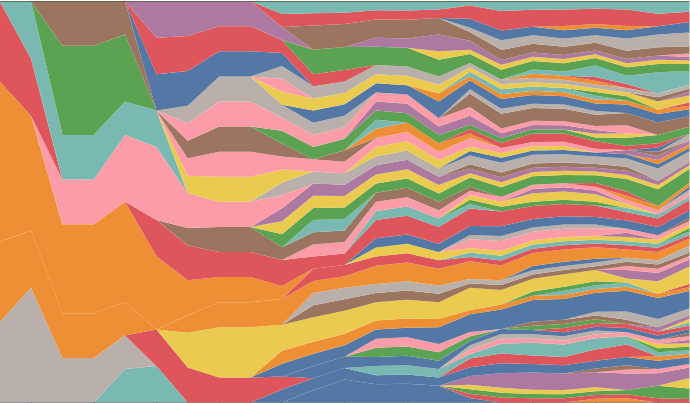
</code></pre></div></div>]]></content><author><name>Andy J. Peterson</name></author><category term="Typescript" /><category term="Promise" /><category term="software development" /><category term="Advanced Javascript" /><category term="Javascript" /><summary type="html"><![CDATA[On a recent project, I needed to detect whether I was given a promise or not. This seems like a weird requirement, but I was writing a “makeRetryable” function that I wanted to work for both synchronous or asynchronous code. Trust me, it was real.]]></summary></entry><entry><title type="html">Open Source Built Technology Stacks</title><link href="https://blog.ndpsoftware.com/2023/04/technology-specialization-visualization" rel="alternate" type="text/html" title="Open Source Built Technology Stacks" /><published>2023-04-03T00:00:00+00:00</published><updated>2023-04-03T00:00:00+00:00</updated><id>https://blog.ndpsoftware.com/2023/04/technology-specialization-visualization</id><content type="html" xml:base="https://blog.ndpsoftware.com/2023/04/technology-specialization-visualization"><![CDATA[<p>I was engaged in the banal activity of revising  <a href="https://github.com/ndp/resume">my resume</a>, when I innocently created the janky piece of modern art. <img src="/assets/posts/2023/viz-techs.png" style="float: right; width: 63%; margin: 10px 0 10px 10px;" />   It shows the number of technologies I use in my jobs (and would include on my resume), grouped by year. As it clearly shows, the number of technologies started slow, and is now huge. Perhaps the specific tools are no longer important? To explain, let me go back.</p>

<p>My first job tech involved typing code written for an Apple II into a Commodore 64, and in the process making it work. I brought no toolbelt with me, just what I’d learned out of borrowed magazines and from hours of experimentation after school in the back of Mr. McLemore’s class. A few years later, on my first day of the job writing software I received my only tool, a Fortran compiler, and I inserted into my <a href="https://www.computinghistory.org.uk/det/1322/Compaq-Portable-Computer/">Compaq portable</a>. Two years later, when writing the first technical publishing app for the Macintosh (TechScriber!), we considered buying a text engine, but decided no, and instead, hired Seth and did it ourselves, using just a C compiler and a home-made OO framework. There was no “open source” library to consult. Developers would bring their own set of tricks, or consult books for ideas and algorithms. This meant that progress would be slow, but you (or somebody at the company), knew every line of code.</p>

<p>There was little “free code”, but to speed up development we got more sophisticated tools.  Our home-made OO framework helped, and LightspeedC and Pascal gave way to Apple’s MPW, which was a scriptable programming environment, like a configurable Python notebook. I would perform large refactorings by writing a long script with lots of regular expressions that ran overnight; and then if it worked, I’d complete the refactorings in the morning. Then tools like ObjectMaster automatically indexed all my code, foreshadowing tools like 21st century IntelliJ IDEA. These were our trusted steeds. But besides our IDE and a few third party tools, like TMON for debugging, we were on our own.</p>

<p>In the early 1990s, we started having more libraries and frameworks from our compiler suppliers. Apple slowly improved the OS APIs. Then they provided the MacApp framework, LightspeedC included TCL (THINK class library), and then Microsoft offered windowing monoliths. But this is a small list– just a few lines on <a href="https://en.wikipedia.org/wiki/List_of_old_Macintosh_software">a Wikipedia page</a>. When Java arrived on the scene, the third party developers got a cohesive library to bootstrap their development.</p>

<p>Once the Internet was going, though, things changed: Open source libraries appeared, and development radically changed. We got competing, easily adoptable tools and code we could adopt, like Apache Log4j, JUnit and the Spring, an open source framework that “disrupted” Sun’s J2EE environment. All of a sudden, we’d pull in libraries and we saw some real reduction in the code we had to write– or improvements in what we could build. And there were a few tools as well; I remember contributing to an open-source source code control tool, MacCVS Pro, providing a visualization of code branches, coordinating awkwardly in, well, CVS.</p>

<p>Finally, Git and Github arrived and the open source world exploded. Free tools, libraries and freemium services became readily available. This meant we also had more code to know. As more software moved to the web, we also got code by calling third part services. This was originally a simple integration, perhaps with a Google Analytics integrations. But these days, it is easy to have a dozen services in use by your web app in the first week of setting things up.</p>

<p>In 1994, it was great to have MacApp on your resume, because it was likely the framework a future employee would use, and you’d spent significant time learning it. But these days, there are so many tools it is hard to know which ones to list. Today’s equivalent of MacApp, React, has a half-dozen tools that go along with it for state management, packaging, deployment, testing, logging, messaging, etc. In that context, having “React” on a resume isn’t saying that much. But to accurately capture the tools, you’d need long lists.</p>

<p>One implication of the current situation is that knowledge of any specific tool is not that important, but what is more important is:</p>

<ul>
  <li>the ability to evaluate and select tools</li>
  <li>the ability to quickly learn new tools</li>
  <li>knowledge of the overall ecosystem and how tools fit together</li>
  <li>wisdom about the industry that will allow you to properly predict which technologies will see success.</li>
</ul>

<p>It would be great to include these skills when hiring new engineers. I recently revamped <a href="https://github.com/ndp/resume">my resume</a>, stripping away the clutter to tell a more coherent story about my career. In the process, as I removed many details from my resume. (I moved them into a spreadsheet.) Seeing it, I couldn’t resist the urge to experiment with visualizing this data.   One chart in particular, despite pushing the limits of charting tools and guidelines, vividly illustrates the explosive growth in the number of technologies we developers use day-to-day.</p>

<div id="observablehq-areaChart-bc88c6cc"></div>
<p style="font-size: small; line-height: 1.2">Hover over a color to see a different tool or technology (with some color repeats). Years are along the X axis. Usage is not to any scale. Credit: <a href="https://observablehq.com/d/833e598c806e2930@377">Technologies I Have Used by NDP</a> </p>
<link rel="stylesheet" href="https://cdn.jsdelivr.net/npm/@observablehq/inspector@5/dist/inspector.css" />

<script type="module">
import {Runtime, Inspector} from "https://cdn.jsdelivr.net/npm/@observablehq/runtime@5/dist/runtime.js";
import define from "https://api.observablehq.com/d/833e598c806e2930@377.js?v=3";
new Runtime().module(define, name => {
  if (name === "areaChart") return new Inspector(document.querySelector("#observablehq-areaChart-bc88c6cc"));
  return ["key"].includes(name);
});
</script>

<p>I’ll add some more ideas, and you can poke around <a href="https://observablehq.com/d/833e598c806e2930">in the workbook on observablehq</a>.</p>]]></content><author><name>Andy J. Peterson</name></author><category term="HTML" /><category term="CSS" /><category term="software development" /><category term="visualization" /><category term="javascript" /><category term="prototyping" /><category term="mini-project" /><category term="resume" /><category term="job search" /><summary type="html"><![CDATA[I was engaged in the banal activity of revising my resume, when I innocently created the janky piece of modern art. It shows the number of technologies I use in my jobs (and would include on my resume), grouped by year. As it clearly shows, the number of technologies started slow, and is now huge. Perhaps the specific tools are no longer important? To explain, let me go back.]]></summary></entry><entry><title type="html">Technology Cleanse: GoToMyHead.site Case Study</title><link href="https://blog.ndpsoftware.com/2023/03/go-to-my-head-story" rel="alternate" type="text/html" title="Technology Cleanse: GoToMyHead.site Case Study" /><published>2023-03-21T00:00:00+00:00</published><updated>2023-03-21T00:00:00+00:00</updated><id>https://blog.ndpsoftware.com/2023/03/go-to-my-head-story</id><content type="html" xml:base="https://blog.ndpsoftware.com/2023/03/go-to-my-head-story"><![CDATA[<p>I recently spent a few hours building  <a href="https://www.gotomyhead.site">gotomyhead.site</a>, which is an MVP app to find lead sheets in the popular fake (aka real) books. (You can read more about it <a href="https://blog.ndpsoftware.com/go-to-my-head">here</a>.) It’s a “mini-project”, and even if the project domain itself doesn’t interest you, my development approach gave me what I think are interesting insights to share.</p>

<p>The modern way to create  software app is to clone a template app or run a “meta” script that installs all the “stuff you’re going to need” for a modern web app. This setup step is exemplified in the ambitious and popular CreateReactApp. Rails, a complete framework itself, even spawned <a href="http://railsapps.github.io/rails-application-templates.html">tools to give you you even more.</a>. A recent trend is for hosting providers (PAASes) to leverage (or even provide) these setup tools to bring you to their hosting platform. Sadly, many new web engineers see this as the first step to any project.</p>

<p>To be honest, I’ve never liked this approach. Yes, you’re up and going fast, but the cost is high, but paid later. The abstraction of these great “uber” tool provide fails, as you <em>are</em> going to need to know how to deal with the underlying technologies. Because of the fast-evolving tech ecosystem, you’ll run into the problems almost immediately. You quickly discover that the uber-tool you used to build your app doesn’t have all the documentation for the underlying technologies. You’ll realize that unless you understand how all the pieces fit together, it will be hard to fix problems (unless a StackOverflow answer comes to your rescue). You have to break open config files to figure out where to look, and which versions are involved. This challenge becomes even more acute as the software evolves, as you need to upgrade these underlying tools to fix security vulnerabilities or bugs. Although it’s not impossible to solve, it’s a rare uber-framework that has a good maintenance and upgrade story.</p>

<p>Instead, I like to approach new projects by <em>reluctantly adopting technology</em>.  As a result of this practice, my projects tend to have fewer dependencies than my peers’ projects. It’s the agile approach of only adding a tool when you feel real pain in not having it. For example, for one web app we built from the start, we didn’t even select a database nor create the  schema for weeks into the project. (In fact, we did user testing on our production app before we had a database!) Instead, we simply modeled what we needed to in data structures built-in to the language. When we adopted a database eventually, we had an strong idea about what the schema and data looked like.</p>

<p>I don’t like these starting with a large set of dependencies, but I have found myself installing Typescript, a code bundler like ESBuild, a web server and a testing framework. I tend to think of Typescript as a low-bar for new projects, but this time I decided to even question that. And as soon as I decided to forego Typescript, I wondered how few dependencies I could get away with. It became a <em>cleanse</em>, or sorts, and I ended up without <em>any</em> libraries or dependencies. Although this little app could be a standard database-driven web app, it didn’t need to be. Here’s a blow-by-blow description of how I developed a no-tech web app:</p>

<h3 id="data">Data</h3>

<p>The first step was to grab some data. I discovered quite a few projects out there focused on creating the data I needed, so I went with the “what’s the fastest and cheapest” approach, and found a unified file that had just the data I needed. (I’d make different trade-offs on other projects.)</p>

<h4 id="ingestion">Ingestion</h4>

<p>I found a space-separated text file and put it in a <code class="language-plaintext highlighter-rouge">data</code> folder inside my empty project direction. It has a tune title (with spaces), a book “code” and a page number:</p>
<div class="language-plaintext highlighter-rouge"><div class="highlight"><pre class="highlight"><code>...
Triple Play JazzLTD 363
Triste Colorado 251
Triste NewReal1 370
...
</code></pre></div></div>
<p>To make this usable in a modern app, it would be easier if it were JSON, so I created my second file, an  ingestion script in Javascript that converted it to JSON. Even if I did need a database later, this would be a good intermediate step. This is straightforward nodeJS script that gave me a long list of chart entries:</p>
<div class="language-javascript highlighter-rouge"><div class="highlight"><pre class="highlight"><code>  <span class="p">...</span>
  <span class="p">.</span><span class="nx">split</span><span class="p">(</span><span class="dl">'</span><span class="se">\n</span><span class="dl">'</span><span class="p">).</span><span class="nx">filter</span><span class="p">(</span><span class="nx">line</span> <span class="o">=&gt;</span> <span class="o">!!</span><span class="nx">line</span><span class="p">)</span>
  <span class="p">.</span><span class="nx">map</span><span class="p">(</span><span class="nx">line</span> <span class="o">=&gt;</span> <span class="p">{</span>
    <span class="kd">const</span> <span class="nx">m</span> <span class="o">=</span> <span class="sr">/^</span><span class="se">(</span><span class="sr">.*</span><span class="se">)</span><span class="sr"> </span><span class="se">(\w</span><span class="sr">+</span><span class="se">)</span><span class="sr"> </span><span class="se">(</span><span class="sr">A</span><span class="se">?\d</span><span class="sr">+</span><span class="se">)</span><span class="sr">$/</span><span class="p">.</span><span class="nx">exec</span><span class="p">(</span><span class="nx">line</span><span class="p">)</span>
    <span class="k">return</span> <span class="p">{</span>
      <span class="na">name</span><span class="p">:</span> <span class="nx">m</span><span class="p">[</span><span class="mi">1</span><span class="p">],</span>
      <span class="na">book</span><span class="p">:</span> <span class="nx">m</span><span class="p">[</span><span class="mi">2</span><span class="p">],</span>
      <span class="na">page</span><span class="p">:</span> <span class="nx">m</span><span class="p">[</span><span class="mi">3</span><span class="p">],</span>
    <span class="p">}</span>
  <span class="p">})</span>
</code></pre></div></div>
<h4 id="data-modeling">Data Modeling</h4>

<p>One of my complaints I have about the other tools is that they list the same song multple times in the search results, making the user sort it out. This is like a google that doesn’t aggregate the pages from the same site! I wanted to do better, and make it easy for the user to select the chart in the book they wanted. So I need to distinguish between a <strong>song</strong> and a <strong>chart</strong>: it’s a 1 to N relationship, multiple fake books will have the same song, and the performer wants to be able to pick one chart. This is a traditional parent-child relationship, with foreign keys and multiple database table. But I am not feeling the need for a database, yet, so instead I’ll transform it to a more usable JSON format:</p>
<div class="language-typescript highlighter-rouge"><div class="highlight"><pre class="highlight"><code><span class="p">[</span>
   <span class="p">{</span>
      <span class="na">songName</span><span class="p">:</span> <span class="kr">string</span><span class="p">,</span>
      <span class="na">books</span><span class="p">:</span> <span class="p">{</span>
           <span class="p">[</span><span class="nx">book_title</span><span class="p">]:</span>  <span class="kr">number</span>
         <span class="p">}</span>
   <span class="p">},</span>
   <span class="p">...</span>
<span class="p">]</span>
</code></pre></div></div>
<p>This is a basic <code class="language-plaintext highlighter-rouge">groupBy</code> function, handled by a reduce call.</p>

<p>I wrote it, but quickly ran across a complication.  I discovered that the chart titles for the same song often don’t match. The simplest title can show up a variety of ways:</p>

<ul>
  <li><em>Shadow Of Your Smile</em></li>
  <li><em>The Shadow Of Your Smile</em></li>
  <li><em>Shadow Of Your Smile (The)</em></li>
</ul>

<p>These match to a human, but not a computer. In addition, a song might also (sometimes) include the first line, as in <em>These Foolish Things (Remind Me Of You)</em>. There are also reasonable spelling variations, like  <em>until</em> or <em>‘til</em> or <em>till</em>. And numbers are sometimes spelled out and sometimes not.</p>

<p>This is a common software engineering problem, and I have found the easiest solution is to create a single “spelling” for a song title that will map all spellings of the same song into the same “song key”. It’s similar to a hash key that maps them to the same bucket. I call this the <strong>canonical key</strong> for a song. (<em>Not</em> the “key”, like Bb or F#.) It’s a simple function:</p>
<div class="language-javascript highlighter-rouge"><div class="highlight"><pre class="highlight"><code><span class="kd">function</span> <span class="nx">songKey</span> <span class="p">(</span><span class="nx">s</span><span class="p">)</span> <span class="p">{</span>
  <span class="k">return</span> <span class="nx">s</span>
    <span class="p">.</span><span class="nx">replace</span><span class="p">(</span><span class="sr">/^</span><span class="se">(</span><span class="sr">the|a</span><span class="se">)</span><span class="sr"> /i</span><span class="p">,</span> <span class="dl">''</span><span class="p">)</span>
    <span class="p">.</span><span class="nx">replace</span><span class="p">(</span><span class="sr">/ </span><span class="se">\(</span><span class="sr">.*</span><span class="se">\)</span><span class="sr">$/</span><span class="p">,</span> <span class="dl">''</span><span class="p">)</span>   <span class="c1">// throw away first line hints</span>
    <span class="p">.</span><span class="nx">replace</span><span class="p">(</span><span class="sr">/ three /</span><span class="p">,</span> <span class="dl">'</span><span class="s1"> 3 </span><span class="dl">'</span><span class="p">)</span>
    <span class="p">.</span><span class="nx">replace</span><span class="p">(</span><span class="sr">/in'/</span><span class="p">,</span> <span class="dl">'</span><span class="s1">ing</span><span class="dl">'</span><span class="p">)</span>
    <span class="p">.</span><span class="nx">replace</span><span class="p">(</span><span class="sr">/'</span><span class="se">?</span><span class="sr">Till</span><span class="se">?</span><span class="sr"> /</span><span class="p">,</span> <span class="dl">'</span><span class="s1">Til </span><span class="dl">'</span><span class="p">)</span>
    <span class="p">.</span><span class="nx">replace</span><span class="p">(</span><span class="sr">/'Bout/</span><span class="p">,</span> <span class="dl">'</span><span class="s1">About</span><span class="dl">'</span><span class="p">)</span>
    <span class="p">.</span><span class="nx">replace</span><span class="p">(</span><span class="sr">/ O' /</span><span class="p">,</span> <span class="dl">'</span><span class="s1"> Of </span><span class="dl">'</span><span class="p">)</span>
    <span class="p">.</span><span class="nx">replace</span><span class="p">(</span><span class="sr">/Walkin</span><span class="se">(</span><span class="sr">'|g</span><span class="se">)?</span><span class="sr">/</span><span class="p">,</span> <span class="dl">'</span><span class="s1">Walking</span><span class="dl">'</span><span class="p">)</span>
    <span class="p">.</span><span class="nx">replaceAll</span><span class="p">(</span><span class="sr">/</span><span class="se">\W</span><span class="sr">/g</span><span class="p">,</span> <span class="dl">''</span><span class="p">)</span>     <span class="c1">// squish</span>
    <span class="p">.</span><span class="nx">toLocaleLowerCase</span><span class="p">()</span>
<span class="p">}</span>
</code></pre></div></div>
<p>So, I pipe the array of songs and assign them each a key. Then, I combine the entries using <code class="language-plaintext highlighter-rouge">reduce</code>, as anticipated. But now that I have a key distinct from the song name, I switch the data structure to an object (map):</p>
<div class="language-javascript highlighter-rouge"><div class="highlight"><pre class="highlight"><code>  <span class="p">.</span><span class="nx">reduce</span><span class="p">((</span><span class="nx">m</span><span class="p">,</span> <span class="nx">chart</span><span class="p">)</span> <span class="o">=&gt;</span> <span class="p">{</span>
    <span class="kd">const</span> <span class="nx">key</span> <span class="o">=</span> <span class="nx">songKey</span><span class="p">(</span><span class="nx">chart</span><span class="p">.</span><span class="nx">name</span><span class="p">)</span>
    <span class="k">if</span> <span class="p">(</span><span class="o">!</span><span class="nx">m</span><span class="p">[</span><span class="nx">key</span><span class="p">])</span> <span class="p">{</span>
      <span class="nx">m</span><span class="p">[</span><span class="nx">key</span><span class="p">]</span> <span class="o">=</span> <span class="p">{</span>
        <span class="na">names</span><span class="p">:</span> <span class="p">[</span><span class="nx">name</span><span class="p">],</span> <span class="c1">// save multiple names to aid in search</span>
        <span class="na">books</span><span class="p">:</span> <span class="p">{</span>
          <span class="p">[</span><span class="nx">chart</span><span class="p">.</span><span class="nx">book</span><span class="p">]:</span> <span class="nx">chart</span><span class="p">.</span><span class="nx">page</span><span class="p">,</span>
        <span class="p">},</span>
      <span class="p">}</span>
    <span class="p">}</span> <span class="k">else</span> <span class="p">{</span>
      <span class="c1">// save multiple names for the same song</span>
      <span class="k">if</span> <span class="p">(</span><span class="o">!</span><span class="nx">m</span><span class="p">[</span><span class="nx">key</span><span class="p">].</span><span class="nx">names</span><span class="p">.</span><span class="nx">includes</span><span class="p">(</span><span class="nx">name</span><span class="p">))</span>
        <span class="nx">m</span><span class="p">[</span><span class="nx">key</span><span class="p">].</span><span class="nx">names</span><span class="p">.</span><span class="nx">push</span><span class="p">(</span><span class="nx">name</span><span class="p">)</span>
      <span class="nx">m</span><span class="p">[</span><span class="nx">key</span><span class="p">].</span><span class="nx">books</span><span class="p">[</span><span class="nx">chart</span><span class="p">.</span><span class="nx">book</span><span class="p">]</span> <span class="o">=</span> <span class="nx">chart</span><span class="p">.</span><span class="nx">page</span>
    <span class="p">}</span>
    <span class="k">return</span> <span class="nx">m</span>
  <span class="p">},</span>
  <span class="p">{}</span>
<span class="p">)</span>
</code></pre></div></div>
<p>That was it. I had a nice JSON file with the data I needed.</p>

<h3 id="html">HTML</h3>

<p>The next step was to build some markup so I created an <code class="language-plaintext highlighter-rouge">index.html</code> file circa 1998, and added what was needed: an <code class="language-plaintext highlighter-rouge">input</code> field and an <code class="language-plaintext highlighter-rouge">ol</code> tag to hold the search results.</p>
<div class="language-html highlighter-rouge"><div class="highlight"><pre class="highlight"><code><span class="cp">&lt;!DOCTYPE html&gt;</span>
<span class="nt">&lt;html</span> <span class="na">lang=</span><span class="s">"en"</span><span class="nt">&gt;</span>
<span class="nt">&lt;head&gt;</span>
  <span class="nt">&lt;meta</span> <span class="na">charset=</span><span class="s">"UTF-8"</span> <span class="nt">/&gt;</span>
  <span class="nt">&lt;title&gt;</span>TBD<span class="nt">&lt;/title&gt;</span>
<span class="nt">&lt;/head&gt;</span>
<span class="nt">&lt;body&gt;</span>
<span class="nt">&lt;label</span> <span class="na">for=</span><span class="s">"q"</span><span class="nt">&gt;</span>
  <span class="nt">&lt;input</span> <span class="na">id=</span><span class="s">"q"</span> <span class="na">autofocus</span> <span class="na">placeholder=</span><span class="s">'Type "Go to my Head"'</span><span class="nt">&gt;</span>
<span class="nt">&lt;/label&gt;</span>
<span class="nt">&lt;ol&gt;</span>
<span class="nt">&lt;/ol&gt;</span>
...
</code></pre></div></div>

<h3 id="javascript">Javascript</h3>

<p>Next, I needed to do the search. I really like interactive searches, like <a href="https://amp-what.com">AmpWhat</a>, despite them being non-standard. (Typically this interaction looks more like an autocomplete, and it might make sense to switch to it.) But for starters, I’d just do a query on <code class="language-plaintext highlighter-rouge">keyup</code> events. (On my phone, this performed well, but it may need some throttling for slower machines.). I created a Javascript file for my web site and included it at the end of my <code class="language-plaintext highlighter-rouge">index.html</code>.</p>
<div class="language-javascript highlighter-rouge"><div class="highlight"><pre class="highlight"><code><span class="kd">const</span> <span class="nx">q</span> <span class="o">=</span> <span class="nb">document</span><span class="p">.</span><span class="nx">getElementById</span><span class="p">(</span><span class="dl">'</span><span class="s1">q</span><span class="dl">'</span><span class="p">)</span>
<span class="nx">q</span><span class="p">.</span><span class="nx">addEventListener</span><span class="p">(</span><span class="dl">'</span><span class="s1">keyup</span><span class="dl">'</span><span class="p">,</span> <span class="nx">e</span> <span class="o">=&gt;</span> <span class="p">{</span>
  <span class="kd">const</span> <span class="nx">matches</span> <span class="o">=</span> <span class="nx">findMatches</span><span class="p">(</span><span class="nx">q</span><span class="p">.</span><span class="nx">value</span><span class="p">)</span>
  <span class="nx">showMatches</span><span class="p">(</span><span class="nx">matches</span><span class="p">)</span>
<span class="p">})</span>
</code></pre></div></div>

<p><code class="language-plaintext highlighter-rouge">findMatches</code> and <code class="language-plaintext highlighter-rouge">showMatches</code> don’t exist yet, so I need to write them. Each of these could involve pulling in helper libraries (databases, rendering engines), but I started with just the built-in technology.</p>

<h4 id="findmatches-function-a-humble-search-engine"><code class="language-plaintext highlighter-rouge">findMatches</code> Function: a Humble Search Engine</h4>

<p>I won’t show it here, but the first version of <code class="language-plaintext highlighter-rouge">findMatches</code> I wrote by traversing through the JSON generated from the ingestion. For each song, I match the typed query against any of the names used for it, and then I sort the matching songs based on how well it matches. Each song match gets a “score”, with extra points for whole word matches and the beginning of the song’s name. A fairly simple heuristic like this, from my experience, produces nice results on a limited dataset like this. I’ve spent years tweaking another version of it I use on <a href="https://www.amp-what.com/">AmpWhat</a></p>

<p>I didn’t need to reach for another library to do this, and certainly not a database. People reach for databases because they are concerned about speed and memory, but in the modern world, browsers can execute 1000s of regular expressions per second, so it will be plenty fast. And the data file wasn’t big by today’s standards.</p>

<h4 id="rendering-in-showmatches">Rendering in <code class="language-plaintext highlighter-rouge">showMatches</code></h4>

<p>To build the <code class="language-plaintext highlighter-rouge">showMatches</code>, I relied on the browser’s built-in DOM API. Devs are immediately jump to rendering or templating engines like JSX and can forget that the built-in DOM API has evolved through the years. Here’s a rough version of the first pass:</p>
<div class="language-javascript highlighter-rouge"><div class="highlight"><pre class="highlight"><code><span class="kd">function</span> <span class="nx">showMatches</span> <span class="p">(</span><span class="nx">matches</span><span class="p">)</span> <span class="p">{</span>
  <span class="kd">const</span> <span class="nx">listItems</span> <span class="o">=</span> <span class="nx">matches</span>
    <span class="p">.</span><span class="nx">map</span><span class="p">(</span><span class="nx">m</span> <span class="o">=&gt;</span> <span class="p">{</span>
      <span class="kd">const</span> <span class="nx">e</span> <span class="o">=</span> <span class="nb">document</span><span class="p">.</span><span class="nx">createElement</span><span class="p">(</span><span class="dl">'</span><span class="s1">li</span><span class="dl">'</span><span class="p">)</span>
      <span class="nx">e</span><span class="p">.</span><span class="nx">appendChild</span><span class="p">(</span><span class="nx">span</span><span class="p">(</span><span class="dl">'</span><span class="s1">name</span><span class="dl">'</span><span class="p">,</span> <span class="nx">m</span><span class="p">.</span><span class="nx">names</span><span class="p">[</span><span class="mi">0</span><span class="p">]))</span>
      <span class="kd">const</span> <span class="nx">books</span> <span class="o">=</span> <span class="nb">document</span><span class="p">.</span><span class="nx">createElement</span><span class="p">(</span><span class="dl">'</span><span class="s1">ul</span><span class="dl">'</span><span class="p">)</span>
      <span class="nb">Object</span><span class="p">.</span><span class="nx">entries</span><span class="p">(</span><span class="nx">m</span><span class="p">.</span><span class="nx">books</span><span class="p">)</span>
            <span class="p">.</span><span class="nx">forEach</span><span class="p">(</span><span class="nx">b</span> <span class="o">=&gt;</span> <span class="p">{</span>
              <span class="kd">const</span> <span class="nx">book</span> <span class="o">=</span> <span class="nb">document</span><span class="p">.</span><span class="nx">createElement</span><span class="p">(</span><span class="dl">'</span><span class="s1">li</span><span class="dl">'</span><span class="p">)</span>
              <span class="nx">book</span><span class="p">.</span><span class="nx">appendChild</span><span class="p">(</span><span class="nx">span</span><span class="p">(</span><span class="dl">'</span><span class="s1">title</span><span class="dl">'</span><span class="p">,</span> <span class="nx">b</span><span class="p">[</span><span class="mi">0</span><span class="p">]))</span>
              <span class="nx">book</span><span class="p">.</span><span class="nx">appendChild</span><span class="p">(</span><span class="nx">span</span><span class="p">(</span><span class="dl">'</span><span class="s1">p</span><span class="dl">'</span><span class="p">,</span> <span class="nx">b</span><span class="p">[</span><span class="mi">1</span><span class="p">]))</span>
              <span class="nx">books</span><span class="p">.</span><span class="nx">appendChild</span><span class="p">(</span><span class="nx">book</span><span class="p">)</span>
            <span class="p">})</span>
      <span class="nx">e</span><span class="p">.</span><span class="nx">appendChild</span><span class="p">(</span><span class="nx">books</span><span class="p">)</span>
      <span class="k">return</span> <span class="nx">e</span>
    <span class="p">})</span>

  <span class="kd">function</span> <span class="nx">span</span> <span class="p">(</span><span class="nx">cls</span><span class="p">,</span> <span class="nx">value</span><span class="p">)</span> <span class="p">{</span>
    <span class="kd">const</span> <span class="nx">sp</span> <span class="o">=</span> <span class="nb">document</span><span class="p">.</span><span class="nx">createElement</span><span class="p">(</span><span class="dl">'</span><span class="s1">span</span><span class="dl">'</span><span class="p">)</span>
    <span class="nx">sp</span><span class="p">.</span><span class="nx">setAttribute</span><span class="p">(</span><span class="dl">'</span><span class="s1">class</span><span class="dl">'</span><span class="p">,</span> <span class="nx">cls</span><span class="p">)</span>
    <span class="nx">sp</span><span class="p">.</span><span class="nx">innerText</span> <span class="o">=</span> <span class="nx">value</span>
    <span class="k">return</span> <span class="nx">sp</span>
  <span class="p">}</span>

  <span class="c1">// insert it in the DOM</span>
  <span class="kd">const</span> <span class="nx">ol</span> <span class="o">=</span> <span class="nb">document</span><span class="p">.</span><span class="nx">getElementsByTagName</span><span class="p">(</span><span class="dl">'</span><span class="s1">ol</span><span class="dl">'</span><span class="p">)[</span><span class="mi">0</span><span class="p">]</span>
  <span class="nx">ol</span><span class="p">.</span><span class="nx">replaceChildren</span><span class="p">(...</span><span class="nx">listItems</span><span class="p">)</span>
<span class="p">}</span>
</code></pre></div></div>
<p>This works, and it’s simple. And right off, the search was working relatively well.</p>

<h4 id="data-cleansing">Data Cleansing</h4>

<p>Once I saw results, I saw errors in my source data. I could have looked for a new dataset, but it seemed like a small problem at first, so I made the small fix. There were typos and OCR errors, as someone had scanned index pages with what is now obsolete technology.</p>

<p>On previous projects in this situation, I have found it helpful to have a function specific to cleaning up the data, and using it as early in the flow as possible. Otherwise the same problem is solved in the wrong place, like in the <code class="language-plaintext highlighter-rouge">songKey</code> function or in the front-end UI, or perhaps both. So I added a <code class="language-plaintext highlighter-rouge">fixName</code> function that is used before anything is done with a song’s title:</p>

<div class="language-javascript highlighter-rouge"><div class="highlight"><pre class="highlight"><code><span class="kd">function</span> <span class="nx">fixName</span> <span class="p">(</span><span class="nx">name</span><span class="p">)</span> <span class="p">{</span>
  <span class="k">return</span> <span class="nx">name</span><span class="p">.</span><span class="nx">replace</span><span class="p">(</span><span class="sr">/ 15 /</span><span class="p">,</span> <span class="dl">'</span><span class="s1"> Is </span><span class="dl">'</span><span class="p">)</span>
             <span class="p">.</span><span class="nx">replace</span><span class="p">(</span><span class="sr">/Reincarna11on /</span><span class="p">,</span> <span class="dl">'</span><span class="s1">Reincarnation </span><span class="dl">'</span><span class="p">)</span>
             <span class="p">.</span><span class="nx">replace</span><span class="p">(</span><span class="sr">/Sey40r /</span><span class="p">,</span> <span class="dl">'</span><span class="s1">Señor </span><span class="dl">'</span><span class="p">)</span>
<span class="p">...</span>
</code></pre></div></div>

<p>This may seem odd to express in code, and not just fix the source file, but from my experience, it’ll be easier in the long term. If I ever need to upgrade the source data, if I’d edited the file I would need to redo all the corrections I’d made the first time. There are several alternatives that I might move to:</p>

<ul>
  <li>This code can be made to be data-driven, by building out some sort of “corrections” file.</li>
  <li>A third solution would be to “push the fixes upstream” into the souce of the data file. This <em>is</em> a good solution, but requires more time than I will spend on this project. As I’m not that commited to this data set, I haven’t done it yet.</li>
</ul>

<p>Again, these are data <em>errors</em>, and not stylistic preferences like the spelling of “until”. As such, they are fixed in the data when it first appears. It’s always better to fix the errors in the right place, as early as possible. Otherwise you end up coding around them “downstream”.</p>

<h3 id="css--design">CSS / Design</h3>

<p>Although I could see (and fix) the search results, the design is just default browser muck, so I needed to invest a couple hours in design. For colors, I started by looking for inspiration in photos of nightclubs. Unfortunately my ability to put  together a wide variety of rich colors harmoniously is too ambitious for this project. However, I saw that the idea of deep accent colors on a black background was something I could pull off.</p>

<p>But a plain black background was just too boring, so I hunted for an open source photo, something very dark and “nightcluby”, but to no avail. I eventually hunted through my own Google photos, narrowed the selection down. and ended up with a trumpet that I’d photographed for insurance purposes! I was able to darken and crop it into a background image, and this grounded the app.</p>

<p><img style="width: 300px; float: right; margin: 5px 0 5px 20px; border-radius: 10px;" src="https://www.gotomyhead.site/images/photo/trumpet.jpg" width="300" /></p>

<p>I spent a bit of time on fonts, but didn’t get to perfection. I was hoping to use one of the recognizable real book fonts from volume 1 or 2, but wasn’t able to find them. I used a Courier-like typewriter font, until I realized the distressed look was what I needed. That led me quickly to the main font, <em>Special Elite</em>.  Finally, I added the <em>Impact Label</em> font– the  brand font for <a href="https://ndpsoftware.com">NDP Software</a>. I love how it looks in this design, and I hope and pray I’m not alone.</p>

<h3 id="getting-to-mvp">Getting To MVP</h3>
<p>Although this is the basic process, I did go back and add things like the “clear” button, branding and a footer, feedback links, and analytics. I spent a bit of time testing out queries and improving my ingestion script as I discovered more errors in the raw data. I also spent a little time making it “responsive”, as I wanted it to work well on a phone or tablet.</p>

<h3 id="name-and-hosting">Name and Hosting</h3>
<p>The final piece of the puzzle was to pick a name and stick it up on the web. I tried to use some online tools to help me generate names with puns, rhymes etc., but struck out. In the end, I bootstrapped this part of the process:  I just searched within the tool itself and found an interesting match to the term <code class="language-plaintext highlighter-rouge">head</code>. I bought the name, put the DNS in AWS Route 53, and figured out how to host it on S3 without any servers. Amazon has good tutorials for this, and it turned out to be easy, even though I hadn’t done it before.</p>

<h3 id="progressive-web-app">Progressive Web App</h3>
<p>Now that I had the app basically working, I wanted to make to work offline. (To be honest, I’ve struggled with this, and it still is not working the way I would like.) I want the browser to prompt you to save it when you bring it up with an icon in the URL bar. I did learned how to use service workers, which is a technology I have resisted using since my nightmare experience with its predecesor, appCache.</p>

<p>As I got my service worker going, however, I discovered that to use them, you need to serve your app via <code class="language-plaintext highlighter-rouge">https</code>. AWS had a solution for this, but it a hassle, as you need to set up multiple CloudFront distributions. It felt like this part of the app is the more complicated and delicate engineering.</p>

<blockquote>
  <p>More tools = More troubles.</p>
</blockquote>

<p>And at that point, hosted behind CloudFront with service workers, iterating becomes more difficult. I have to update your service worker’s manifest files with each change, and to test in production, CloudFront can take up to 24 hours to distribute a new push of code. So it is quite tedious to debug making progressive web apps this way. Chrome dev tools provide enough to make this possible, but it’s not as rosy as I’d like.</p>

<h3 id="refection">Refection</h3>
<p>At no point did I find myself reaching for one of the dozens of tools I’ve become expert on in the last few years: no need for React or Typescript, CSS frameworks, Postgres. All of the web technologies have grown to help make things easier, even as more and more libraries have added layers on top. Even though Javascript is still mostly the Javascript of old, the type hints of Typescript and other developer conveniences are now available. And CSS has always been powerful and expressive on its own, and the enhancements like animations and untapped possibilities. And the industry has gone back and forth on what should live in backend servers, but no matter where we are in that cycle, static web hosting has lots going for it. And with Javascript running better in the browser, I could add a database backend and make it work reliably and securely without having to run a web server.</p>

<p>I also found it’s much faster to develop on core technologies rather than libraries. The documentation is much easier to find and deal with, as there’s less messing with tooling and versions (besides MDN and <a href="http://caniuse.com/">caniuse.com</a>). To understand this, compare looking up a simple DOM functiond on MDN, versus peeling the skin off CreateReactApp app with the various versions of React and the dozens of dependencies. Plus, the minimalist approach has advantage in moving forward, as  there will be no expiring tools, when I’ll be forced to upgrade Webpack, or keep <code class="language-plaintext highlighter-rouge">eslint</code> rules up-to-date, or upgrade dependencies with security vulnerabilities.</p>

<p>I’ve made the conscious choice to take the simplest option at every turn. You’d think this would be a recipe for technical debt, but it is just the opposite. It’s kept the code small and there’s no tool that will go out of fashion that I’ll need to migrate away from. There’s just very little to go wrong!</p>

<p>Even if it’s not useful for your development project, I recommend trying someting like this as a “cleansing” exercise next time you have a chance. It will help you next time you’re thinking through library adoptions.</p>]]></content><author><name>Andy J. Peterson</name></author><category term="HTML" /><category term="CSS" /><category term="software development" /><category term="visualization" /><category term="javascript" /><category term="prototyping" /><category term="mini-project" /><summary type="html"><![CDATA[I recently spent a few hours building gotomyhead.site, which is an MVP app to find lead sheets in the popular fake (aka real) books. (You can read more about it here.) It’s a “mini-project”, and even if the project domain itself doesn’t interest you, my development approach gave me what I think are interesting insights to share. [ { songName: string, books: { [book_title]: number]]></summary></entry><entry><title type="html">Quick Review: Weird in a World That’s Not: A Career Guide for Misfits, F*ckups, and Failures</title><link href="https://blog.ndpsoftware.com/2023/02/review-romolini-weird" rel="alternate" type="text/html" title="Quick Review: Weird in a World That’s Not: A Career Guide for Misfits, F*ckups, and Failures" /><published>2023-02-09T00:00:00+00:00</published><updated>2023-02-09T00:00:00+00:00</updated><id>https://blog.ndpsoftware.com/2023/02/review-romolini-weird</id><content type="html" xml:base="https://blog.ndpsoftware.com/2023/02/review-romolini-weird"><![CDATA[<p>I just finished <a href="https://amzn.to/3xc4M3G">listening to</a> <a href="https://amzn.to/3Yo3AWS">Weird in a World That’s Not</a> by Jennifer Romolini. <img src="https://m.media-amazon.com/images/I/61VQQtdtVsL.jpg" style="width: 30%; float: right" />  She takes you from her being a misfit in high school to college experiences, all the way through a meandering path to high-tech start-up/Brooklyn/kids/mom/psychics nivana.</p>

<p>It’s a quick read (listen), and there is plenty of entertaining stories and advice (mostly for younger folks), but my main takeaway is: this is an refreshing book, sprinkled with feminism, neurodiversity, classism, poverty usually sanitized from business manuscripts.</p>

<p>I’ve read lotsa business books, and memoirs often have a “be yourself” theme. But in Romolini’s, it’s more refreshingly and candidly presented than I’ve read before. It convinced me there’s hope. Why can’t more business books be like this?</p>]]></content><author><name>Andy J. Peterson</name></author><category term="book recommendations" /><category term="business memoirs" /><summary type="html"><![CDATA[I just finished listening to Weird in a World That’s Not by Jennifer Romolini. She takes you from her being a misfit in high school to college experiences, all the way through a meandering path to high-tech start-up/Brooklyn/kids/mom/psychics nivana.]]></summary></entry><entry><title type="html">Add Types to RegExp Matches in Typescript</title><link href="https://blog.ndpsoftware.com/2022/10/strong-typing-regexp" rel="alternate" type="text/html" title="Add Types to RegExp Matches in Typescript" /><published>2022-10-19T00:00:00+00:00</published><updated>2022-10-19T00:00:00+00:00</updated><id>https://blog.ndpsoftware.com/2022/10/strong-typing-regexp</id><content type="html" xml:base="https://blog.ndpsoftware.com/2022/10/strong-typing-regexp"><![CDATA[<p>I’ve been diving into advanced Typescript, hoping to grow less befuddled when encountering complex type definitions. I’ve converted several projects to Typescript, explored writing typed routers and database adapters, and then, a few days ago, thought of this challenge. I’m a bit of a RegExp nerd, so I wondered if I could make Typescript provide me with  type-ahead for the results of a regular expression match. I suspected it was possible.</p>

<h3 id="named-groups">Named Groups</h3>

<p>It makes sense to use “named groups” for this project. They are a less-used featured of regular expressions, so I’ll recap: they are, as you might expect, a way of naming matching groups. In a pattern, they are specified using a <code class="language-plaintext highlighter-rouge">(?&lt;</code> identifier. Here’s an example capturing a “protocol” group:</p>

<div class="language-typescript highlighter-rouge"><div class="highlight"><pre class="highlight"><code><span class="kd">const</span> <span class="nx">proto</span> <span class="o">=</span> <span class="nb">RegExp</span><span class="p">(</span><span class="dl">'</span><span class="s1">^(?&lt;protocol&gt;http|https|ftp|mailto).*</span><span class="dl">'</span><span class="p">)</span>
</code></pre></div></div>

<p>The rather funky <code class="language-plaintext highlighter-rouge">(?&lt;some-name&gt;...)</code> identifies the named group along with the pattern (between the <code class="language-plaintext highlighter-rouge">&gt;</code> and the closing <code class="language-plaintext highlighter-rouge">)</code>). When you get the result of your regular expression match, you receive a “match” record (or null if there’s no match). This match record has a <code class="language-plaintext highlighter-rouge">groups</code> property, and the value of the groups property, if present, is an object mapping of the named groups to the matched values. It’s easier to see as an example:</p>

<div class="language-typescript highlighter-rouge"><div class="highlight"><pre class="highlight"><code><span class="nx">proto</span><span class="p">.</span><span class="nx">exec</span><span class="p">(</span><span class="dl">'</span><span class="s1">http://example.co</span><span class="dl">'</span><span class="p">).</span><span class="nx">groups</span><span class="p">.</span><span class="nx">protocol</span> <span class="c1">// =&gt; "http"</span>
</code></pre></div></div>

<p>This is nice, and more clear than digging item 4 (or was it 3?) out of an array. It makes your regular expressions easier to maintain (although a bit bulky). There are a few complexities I’m glossing over, but that’s the crux of it.</p>

<h3 id="the-mission">The Mission</h3>

<p>With the built-in types, the <code class="language-plaintext highlighter-rouge">groups</code> property contains a generic record:</p>

<div class="language-typescript highlighter-rouge"><div class="highlight"><pre class="highlight"><code><span class="nx">groups</span><span class="p">?:</span> <span class="p">{</span>
    <span class="p">[</span><span class="na">key</span><span class="p">:</span> <span class="kr">string</span><span class="p">]:</span> <span class="kr">string</span>
<span class="p">}</span>
</code></pre></div></div>

<p>I used a string-literal to input my regular expression, so it would be nice if Typescript would use what it knows to prevent typos in the matched names. Here how I imagine it would suggest property names:</p>

<p><img src="/assets/posts/2022/regexp-types.png" alt="" /></p>

<p>And showing a typo:</p>

<p><img src="/assets/posts/2022/protocall.png" alt="protocall" /></p>

<p>Below, I’ll show you how I did this.</p>

<h3 id="patch-in">Patch in</h3>

<p>Typescript allows you to supplement built-in types. I haven’t experienced this in other languages, and although it can feel like too much flexibility, it also has provided us the ability to create types for hundreds of existing libraries, without having to convert them to Typescript. This was one of the killer features of Typescript that led to its wide adoption, and we’re going to use it here.</p>

<p>My first thought was to modify the existing RegExp object, and make it generic and subtyped on the regular expression. But Typescript objected; we can’t just create a templated RegExp object (ie. <code class="language-plaintext highlighter-rouge">RegExp&lt;T&gt;</code>). It would be too confusing. Learning this, I almost gave up, but I realized there are other routes.</p>

<p>Although I couldn’t make RegExp generic, I could create my own generic subclass, and patch the standard RegExp code to return my new type. That actually seems like a reasonable way to solve these problems in Typescript. I called the new type <code class="language-plaintext highlighter-rouge">RegexWithNamedGroup</code>, and here is an overloaded <code class="language-plaintext highlighter-rouge">new</code> operation that returns it.</p>

<div class="language-typescript highlighter-rouge"><div class="highlight"><pre class="highlight"><code><span class="kr">interface</span> <span class="nx">RegExpConstructor</span> <span class="p">{</span>
  <span class="k">new</span><span class="o">&lt;</span><span class="nx">T</span> <span class="kd">extends</span> <span class="kr">string</span><span class="o">&gt;</span> <span class="p">(</span><span class="nx">pattern</span><span class="p">:</span> <span class="nx">T</span><span class="p">,</span> <span class="nx">flags</span><span class="p">?:</span> <span class="kr">string</span><span class="p">):</span> <span class="nx">RegexWithNamedGroup</span><span class="o">&lt;</span><span class="nx">T</span><span class="o">&gt;</span><span class="p">;</span>
<span class="p">}</span> 
</code></pre></div></div>

<p>(For all this to work in a fully fleshed out solution, I’d also have to patch a few other regular expression methods involved, like <code class="language-plaintext highlighter-rouge">String.prototype.match</code>, <code class="language-plaintext highlighter-rouge">String.prototype.matchAll</code>.)</p>

<p>What I’ve found is generic types will often have to pass the types to other types to get them where they are needed. We need to do that here. The build-in types of a RegExp’s <code class="language-plaintext highlighter-rouge">exec</code> function returns a <code class="language-plaintext highlighter-rouge">RegExpExecArray</code> (or <code class="language-plaintext highlighter-rouge">RegExpMatchArray</code>– same thing). These are arrays of the index matches supplemented with a <code class="language-plaintext highlighter-rouge">groups</code> wildcard object of strings for the named matches. Here’s the supplement:</p>

<div class="language-typescript highlighter-rouge"><div class="highlight"><pre class="highlight"><code><span class="kr">interface</span> <span class="nx">RegExpExecArray</span> <span class="p">{</span>
  <span class="nl">groups</span><span class="p">?:</span> <span class="p">{</span>
    <span class="p">[</span><span class="na">key</span><span class="p">:</span> <span class="kr">string</span><span class="p">]:</span> <span class="kr">string</span>
  <span class="p">}</span>
<span class="p">}</span>
</code></pre></div></div>
<p>We want to make this more specific.  So, instead of returning the <code class="language-plaintext highlighter-rouge">RegExpExecArray</code>, we return our own RegExp type that has its own <code class="language-plaintext highlighter-rouge">exec</code> function that returns its own type.</p>

<div class="language-typescript highlighter-rouge"><div class="highlight"><pre class="highlight"><code><span class="c1">// template-ized RegExp type</span>
<span class="kr">interface</span> <span class="nx">RegexWithNamedGroup</span><span class="o">&lt;</span><span class="nx">S</span> <span class="kd">extends</span> <span class="kr">string</span><span class="o">&gt;</span> <span class="kd">extends</span> <span class="nb">RegExp</span> <span class="p">{</span>
  <span class="nx">exec</span> <span class="p">(</span><span class="nx">s</span><span class="p">:</span> <span class="kr">string</span><span class="p">):</span> <span class="nx">RegExpMatchedGroups</span><span class="o">&lt;</span><span class="nx">S</span><span class="o">&gt;</span> <span class="c1">// my override of RegExpExecArray</span>
<span class="p">}</span>

<span class="c1">// template-ized results type</span>
<span class="kr">interface</span> <span class="nx">RegExpMatchedGroups</span><span class="o">&lt;</span><span class="nx">S</span><span class="o">&gt;</span> <span class="kd">extends</span> <span class="nx">RegExpExecArray</span> <span class="p">{</span>
  <span class="nl">groups</span><span class="p">?:</span> <span class="nx">ExtractGroupNames</span><span class="o">&lt;</span><span class="nx">S</span><span class="o">&gt;</span>
<span class="p">}</span>
</code></pre></div></div>
<p>The groups have a specific type, based on the original RegExp string passed to the constructor. How this works is shown below.</p>

<h3 id="the-magic">The Magic</h3>

<p>You may be thinking I haven’t done anything. Well, just give me a sec. We need to parse through the regular expression string.  The type <code class="language-plaintext highlighter-rouge">ExtractGroupNames</code> builds a record of the specific names found in the regular expression:</p>

<div class="language-typescript highlighter-rouge"><div class="highlight"><pre class="highlight"><code>    <span class="kd">type</span> <span class="nx">ExtractGroupNames</span><span class="o">&lt;</span><span class="nx">S</span> <span class="kd">extends</span> <span class="kr">string</span><span class="o">&gt;</span> <span class="o">=</span>
      <span class="nx">S</span> <span class="kd">extends</span> <span class="s2">`</span><span class="p">${</span><span class="kr">string</span><span class="p">}</span><span class="s2">(?&lt;</span><span class="p">${</span><span class="nx">infer</span> <span class="nx">Name</span><span class="p">}</span><span class="s2">&gt;</span><span class="p">${</span><span class="nx">infer</span> <span class="nx">Rest</span><span class="p">}</span><span class="s2">`</span>
        <span class="p">?</span> <span class="p">(</span><span class="nb">Record</span><span class="o">&lt;</span><span class="nx">Name</span><span class="p">,</span> <span class="kr">string</span><span class="o">&gt;</span> <span class="o">&amp;</span> <span class="nx">ExtractGroupNames</span><span class="o">&lt;</span><span class="nx">Rest</span><span class="o">&gt;</span><span class="p">)</span>
        <span class="p">:</span> <span class="nb">Record</span><span class="o">&lt;</span><span class="nx">never</span><span class="p">,</span> <span class="kr">any</span><span class="o">&gt;</span>
</code></pre></div></div>

<p>This looks weird at first, but not actually that hard to follow, and can be read iteratively.</p>

<ul>
  <li>Line 2: if the type passed in is a string with a named group within in it, do line 3; otherwise, line 4</li>
  <li>Line 3: return a Record matching the named group name intersected with the type of the “rest” of the string. This is basically a recursive call to build up the full type.</li>
  <li>Line 4: If there is no (more) named groups, it simply returns an empty object type, represented as <code class="language-plaintext highlighter-rouge">Record&lt;never, any&gt;</code>.</li>
</ul>

<h3 id="in-conclusion">In Conclusion</h3>

<p>Typescript is a fun language. This particular exercise may be a demonstration of one of the complaints about Typescript: fussing with static types can  be a distraction from solving the important problems. But it was fun to figure out, and after struggling over some related tough problems, felt fairly straightforward. These techniques are applicable for routers and pattern-matching type of code. Let me know if you have an interesting Typescript puzzles– or serious problems– to work out.</p>]]></content><author><name>Andy J. Peterson</name></author><category term="software development" /><category term="typescript" /><category term="advanced typescript" /><category term="regular expressions" /><summary type="html"><![CDATA[I’ve been diving into advanced Typescript, hoping to grow less befuddled when encountering complex type definitions. I’ve converted several projects to Typescript, explored writing typed routers and database adapters, and then, a few days ago, thought of this challenge. I’m a bit of a RegExp nerd, so I wondered if I could make Typescript provide me with type-ahead for the results of a regular expression match. I suspected it was possible.]]></summary></entry><entry><title type="html">Testing React is Testing Me</title><link href="https://blog.ndpsoftware.com/2022/07/testing-react" rel="alternate" type="text/html" title="Testing React is Testing Me" /><published>2022-07-05T00:00:00+00:00</published><updated>2022-07-05T00:00:00+00:00</updated><id>https://blog.ndpsoftware.com/2022/07/testing-react</id><content type="html" xml:base="https://blog.ndpsoftware.com/2022/07/testing-react"><![CDATA[<p>While helping a student at @techtonica write a test for a React component, I encountered a mess just under the surface of React testing.</p>

<h2 id="what-i-found">What I Found</h2>

<p>I jumped back in to testing React (after a couple of years of React-free and noodling on Thoreau, Gauge, and Playwright), and was surprised by how much had changed.</p>

<p>I jumped back in to testing React (after a couple of years of React-free and noodling on <a href="https://github.com/ndp/thoreau">Thoreau</a>, <a href="https://gauge.org/">gauge</a> and <a href="https://playwright.dev/">Playwright</a>), and was surprised by how much had changed. The last time I’d written React, I used Enzyme and Jest, although Enzyme was on its way out. I adapted to the change from Jasmine to Jest, but I wasn’t ready for the transitions that had piled up during my absence. Jumping back in, I discovered:</p>

<ul>
  <li>incompatible Jest configuration changes, <a href="https://testing-library.com/docs/react-testing-library/setup#jest-24-or-lower-and-defaults">version 23 or 24</a> or <a href="https://testing-library.com/docs/react-testing-library/setup#jest-27">version 27</a>?</li>
  <li>abandonment of Enzyme (but 1000s of examples abound)</li>
  <li>We abandoned class-components in favor of “functional” ones, along with using hooks. But I was surprised on how little information there is on testing hooks within components.</li>
  <li>the addition of <a href="https://testing-library.com/docs/react-testing-library/intro/">React Testing Library</a>, replacing many other solutions.</li>
  <li>inconsistent naming of libraries. For example, names of libraries don’t always match their package names, so to a new person, the system seems more complicated than it actually is.</li>
  <li>Mocking seems to have evolved in different ways, and it’s hard to find any two example that agree on what a <code class="language-plaintext highlighter-rouge">mock()</code> functions do. There are, in fact, at least 4 ways to mock a module using Jest, as explained <a href="https://jestjs.io/docs/es6-class-mocks">here</a>. The designers of this library could have helped users by coming up with simpler usage patterns.</li>
  <li>
    <p>A function call to “render” in a React test calls one of 3 different functions that do different things. This is seldom mentioned in the examples of all three found on Stack Overflow and numerous blog posts. Official documentation is confusing because half the examples feature setup/teardown blocks to place the rendered component in the DOM, and the other half seem to skip this step. If you’re not paying attention, you’ll miss it.  The generically named “React Testing Library” tried to address this by adding a third pattern on top the existing multiple “render” patterns. This goal is commendable, but using the same name is inexcuseable.</p>

    <p>To make this slightly more confusing, for quite some time it was recommended practice to override the DOM <code class="language-plaintext highlighter-rouge">render</code> methods in the test setup code, to inject application-specific context. This cleaned up tests, but it also adds a third possibility of what <code class="language-plaintext highlighter-rouge">render</code> might mean. Readers are suitably confused when they see <code class="language-plaintext highlighter-rouge">render</code> in a test.</p>
  </li>
  <li>As a not particularly helpful convenience, <code class="language-plaintext highlighter-rouge">react-testing-library</code> re-exports all <code class="language-plaintext highlighter-rouge">dom-testing-library</code> utilities. The same names mean the same thing, but you would not be crazy to wonder. Good luck if you skip the last sentence of paragraph 4: “so, in the next examples, we will import from @testing-library/react instead of @testing-library/dom.”</li>
</ul>

<h2 id="orientation">Orientation</h2>

<p>Given all that, here’s a brief overview of relevant libraries:</p>

<ul>
  <li>(Not recommended) The React site itself points you here: https://reactjs.org/docs/testing.html. This gives you a somewhat incomplete answer to testing React components.</li>
  <li><a href="https://jestjs.io/"><strong>Jest</strong></a> is a JavaScript test runner that lets you access the DOM. This is what most React tests are built upon. It gives you what you need out of the box quite without fuss.</li>
  <li><strong>React Testing Library</strong> (in package.json is known as <code class="language-plaintext highlighter-rouge">@testing-library/react</code>) combines useful functions of <em>DOM Testing Library</em> with a set of convenient helpers, to provide a unified place to look to test React components. This is a higher-level library than others, and a good place to start if you’re looking for working examples. Here’s a nice intro: https://noriste.github.io/reactjsday-2019-testing-course/book/react-testing-library/. There are both familiar and unfamiliar function signatures here: it re-exports some functions from DOM Testing library, and introduces its own <code class="language-plaintext highlighter-rouge">render</code> method that work well for most tests. Be careful of the overloaded names! But this + Jest and you should be good to go.</li>
  <li><strong>React DOM</strong> is the library that implements <code class="language-plaintext highlighter-rouge">render</code>  in your production React app code. The initial approach to testing components used this, and there are many example that show <a href="https://noriste.github.io/reactjsday-2019-testing-course/book/intro-to-react-testing/react-dom-test-utils.html">writing tests with this ReactDOM.render() method</a>. Using this, you’re testing the real-life code and behavior with a real DOM library. But this technique requires setup and teardown methods to make sure the DOM is ready and cleaned up after tests. It become tedious. Streamlined tools like Enzyme and then DOM Testing Library came in to solve these problems. Sadly, examples using technique look similar <em>but are not compatible with</em> DOM Testing Library. You’ll use this in your app, but not your testing– but watch for examples that use it.</li>
  <li><strong>DOM Testing Library</strong> is a very light-weight solution for answering questions about DOM nodes. It looks for nodes in a DOM tree, using <code class="language-plaintext highlighter-rouge">getBy</code> and <code class="language-plaintext highlighter-rouge">queryBy</code>.  The usage is a bit surprising, but works. You definitely need to <a href="https://noriste.github.io/reactjsday-2019-testing-course/book/react-testing-library/dom-testing-library.html">read the documentation</a> before you start writing tests, so you know what’s there.</li>
  <li>The thrice named <a href="https://reactjs.org/docs/test-utils.html#">Test Utilities, ReactTestUtils, or <code class="language-plaintext highlighter-rouge">react-dom/test-utils</code></a> looks to be outdated. Watch out for these examples and the inconsistent naming here. It has an <code class="language-plaintext highlighter-rouge">act</code> method, but you’re better off heading for <code class="language-plaintext highlighter-rouge">React Testing Library</code>.</li>
</ul>

<h2 id="wrap-up--lessons">Wrap-up &amp; Lessons</h2>

<p><a href="https://noriste.github.io/reactjsday-2019-testing-course/">ReactJSDay 2019 Testing Course</a> has sorted it all out– as of 2019. It’s long but clear. It shows you all the ways to write tests and how they relate. It has good, working examples. I didn’t find another source that described all the pieces like this site does. I’d recommend that over the many medium posts and outdated StackOverflow posts, but you don’t need to read all of this.</p>

<h2 id="lessons-to-learn">Lessons to Learn</h2>

<p>Although I’ve touched on all these above, a few lessons I wish developers of these tools had learned:</p>

<ul>
  <li><em>Name your project and package the same way.</em> People will be confused if you shorten or rearrange words.</li>
  <li><em>If you change the behavior of a function, give it a new name.</em> That’s the rule. If you really can’t use a new name, do something to make it less confusing. You could use a name-spacing convention in all your examples: instead of <code class="language-plaintext highlighter-rouge">import { render } from MyLib</code>, use <code class="language-plaintext highlighter-rouge">import MyLib from 'my-lib'</code>, and then <code class="language-plaintext highlighter-rouge">MyLib.render(&lt;Yeah /&gt;);</code> in examples. Not great, but less confusing.</li>
  <li><em>If you re-export all the functions of another package, you’re not adding any abstraction.</em> No abstraction means more complexity. A move like this is ultimately a net increase of complexity in the ecosystem and can and should be avoided. Just recommend people use the other package directly.</li>
</ul>]]></content><author><name>Andy J. Peterson</name></author><category term="software development" /><category term="testing" /><category term="react" /><category term="sheetshow" /><summary type="html"><![CDATA[While helping a student at @techtonica write a test for a React component, I encountered a mess just under the surface of React testing.]]></summary></entry><entry><title type="html">10 Ways to Cheat at Wordle</title><link href="https://blog.ndpsoftware.com/2022/01/how-to-cheat-at-wordle" rel="alternate" type="text/html" title="10 Ways to Cheat at Wordle" /><published>2022-01-29T00:00:00+00:00</published><updated>2022-01-29T00:00:00+00:00</updated><id>https://blog.ndpsoftware.com/2022/01/how-to-cheat-at-wordle</id><content type="html" xml:base="https://blog.ndpsoftware.com/2022/01/how-to-cheat-at-wordle"><![CDATA[<p>When I first came across <a href="https://www.powerlanguage.co.uk/wordle/">Wordle</a>, I accidentally glanced one of my kid’s screen while walking down the stairs. After I was explained the game by them, I then proceeded to show my prowess by getting my first Wordle right in 1 guess. My family was surprised, but obviously onto me. But this got me started down a bad path of cheating on Wordle.</p>

<p>I decided to have one rule I never broke: never cheat the same way twice.</p>

<p>Herein are some techniques, not definitive. If it’s not obvious from the title, spoiler alert.</p>

<ol>
  <li>Observe someone else’s result “over their shoulder” (timeless hacking technique).</li>
  <li>Use a second device to solve, and then use the answer to solve in 1.</li>
  <li>Play first in “Incognito” mode.</li>
  <li>I was driving with my child and they did the wordle on their phone. I asked them to give it to me verbally. I did great, and when I played on my computer later, I did even better.</li>
  <li>Solve the day’s puzzle in whatever time it takes. After you click “Share”, just edit the block of text it gives you. It looks like an image, but it’s really just text (<a href="https://www.amp-what.com/unicode/search/large%20square">of unicode characters</a>).</li>
  <li>I’m sure there are excellent social media feeds of the current day’s word.</li>
  <li>Google will point you to some ad-rich sites with the answer (and today’s crossword answers).</li>
  <li>Now we get to more serious hacks. Open the Javascript console and type <code class="language-plaintext highlighter-rouge">new wordle.bundle.GameApp().solution</code> and the solution will appear.</li>
  <li>If you don’t want to type, in turns out Wordle uses a database on your machine called “Local Storage” to keep track of things:
    <ol>
      <li>In Chrome with the wordle site up, choose “Developer Tools” from the View menu.</li>
      <li>Navigate to the Application tab if it’s not already up, and then choose “Local Storage”.</li>
      <li>Click in and look at the key “gameState”. It has a sub-key of “solution” with, well, your solution.</li>
    </ol>
  </li>
  <li>Or, see all the answers (past, present and future) in the source code.
    <ol>
      <li>In your browser, go to the “Source” tab.</li>
      <li>From there, go to the “main-XXXX.js” file (the XXXX is a hex signature and will change if a new version is deployed). If your browser suggests to “Pretty Print”, you can do it, but it’s not strictly necessary.</li>
      <li>Now, search for yesterday’s word. The search will take you to an array of all the solutions, ordered by date, so you can see today’s, tomorrow’s and onward. You can simply copy this list, or print it out (or memorize it) for perfect scores.</li>
    </ol>
  </li>
</ol>

<p>I’m sure there are many more, but I haven’t figured them out yet. I spent a few minutes of research about letter frequences. Most sources show you letter frequencies in written English text, but what you want is the frequency in words (or 5-letter words, [or, well, better, Wordle’s list of 5-letter words]).  The ten most common letters in words (in order) are <code class="language-plaintext highlighter-rouge">eariotnslc</code>.</p>

<p>If you start with the words <code class="language-plaintext highlighter-rouge">clean</code> and <code class="language-plaintext highlighter-rouge">riots</code>. This will give you a few letters, and I’ve found I can usually get it from there– but not always.</p>

<p>The fifteen most common letters are found in <code class="language-plaintext highlighter-rouge">lurid month space</code>, which seems to pretty much guarantee a score of 4.</p>

<p>That’s all for now.</p>]]></content><author><name>Andy J. Peterson</name></author><category term="games" /><category term="hacking" /><category term="fun" /><summary type="html"><![CDATA[When I first came across Wordle, I accidentally glanced one of my kid’s screen while walking down the stairs. After I was explained the game by them, I then proceeded to show my prowess by getting my first Wordle right in 1 guess. My family was surprised, but obviously onto me. But this got me started down a bad path of cheating on Wordle.]]></summary></entry><entry><title type="html">Why not use * version numbers?</title><link href="https://blog.ndpsoftware.com/2021/12/package-json-versions" rel="alternate" type="text/html" title="Why not use * version numbers?" /><published>2021-12-02T00:00:00+00:00</published><updated>2021-12-02T00:00:00+00:00</updated><id>https://blog.ndpsoftware.com/2021/12/package-json-versions</id><content type="html" xml:base="https://blog.ndpsoftware.com/2021/12/package-json-versions"><![CDATA[<p>Am I the only one that prefers to use <code class="language-plaintext highlighter-rouge">*</code> for my version specifiers in my package.json file?</p>

<p>Like ya’ll, when I run <code class="language-plaintext highlighter-rouge">yarn outdated</code>, I want to quickly update the outdated packages. My goal is to get the new packages and commit a newer <code class="language-plaintext highlighter-rouge">yarn.lock</code> file. I think the standard process  is to open up your <code class="language-plaintext highlighter-rouge">package.json</code> a start iterating. But honestly, this is a diversion from my goal. And from my experience, it’s quite tedious and error prone.</p>

<p>Additionally, after a little while, a version number in <code class="language-plaintext highlighter-rouge">package.json</code> like <code class="language-plaintext highlighter-rouge">^1.0.2</code> provides little information. It tells me is what the version was <em>when I first added the package.</em> It’s information that will by definition become stale. It’s historical information available in git. It’s non-information and I don’t want it.</p>

<p>My preference is just to list all my dependencies with a <code class="language-plaintext highlighter-rouge">*</code> version. When I run <code class="language-plaintext highlighter-rouge">yarn install</code>, yarn <em>guarantees</em> to get the latest version that is compatible with all my other packages:</p>

<blockquote>
  <p><a href="https://classic.yarnpkg.com/en/docs/cli/install">If yarn.lock is absent, or is not enough to satisfy all the dependencies listed in package.json (for example, if you manually add a dependency to package.json), Yarn looks for the newest versions available that satisfy the constraints in package.json. The results are written to yarn.lock.</a></p>
</blockquote>

<p>So I just let yarn handle the upgrade.</p>

<p>I usually upgrade iteratively, committing as I go. Something like:</p>

<ol>
  <li><code class="language-plaintext highlighter-rouge">yarn outdated</code></li>
  <li>Pick a package and <code class="language-plaintext highlighter-rouge">yarn upgrade a-pkg</code> I will often take a set of packages, such as all the lint-related files at once.</li>
  <li>Test</li>
  <li>If everything is OK, commit: <code class="language-plaintext highlighter-rouge">yarn add yarn.lock</code> and then <code class="language-plaintext highlighter-rouge">git commit -m 'yarn upgrade a-pkg'</code>(I actually type <code class="language-plaintext highlighter-rouge">⬆️ ⬆️ ^A g co -m' ^e '</code>)</li>
  <li>Go to step 1</li>
</ol>

<p>Yarn takes care of all guaranteeing the versions are compatible (or at least think they are).</p>

<p>Why not <code class="language-plaintext highlighter-rouge">*</code>?</p>

<p>(Note: this is written in terms of <code class="language-plaintext highlighter-rouge">yarn</code>, but it also applies to <code class="language-plaintext highlighter-rouge">npm</code> and even Ruby <code class="language-plaintext highlighter-rouge">bundler</code>.)</p>]]></content><author><name>Andy J. Peterson</name></author><category term="software development" /><category term="package" /><category term="nodejs" /><summary type="html"><![CDATA[Am I the only one that prefers to use * for my version specifiers in my package.json file?]]></summary></entry></feed>